
Timesheet invoice
template
An invoice built from an approved timesheet, for contractors billing agencies and clients by the hour or day.
Download the timesheet invoice template
Free, with no sign-up. Replace the words in square brackets with your own details.
The free invoice generator makes a finished PDF with your details, logo and colours. Nothing is stored.
Many agencies and larger clients pay only against an approved timesheet: the manager signs off the hours, and the invoice must match them exactly. A timesheet invoice does that, showing the timesheet reference, each day worked, and the approved hours or days at your rate. This template keeps the invoice and the timesheet in step, so it clears the client's approval process first time.
- Timesheet invoice
- An invoice that bills time from a timesheet the client or agency has approved, listing the days or shifts worked, the hours or days, and the rate. It is standard for contractors and temporary workers supplied through agencies.
When to use a timesheet invoice
Use a timesheet invoice when you work through an agency or for a client whose accounts team pays against approved timesheets: locum and care work, site supervision, IT contracting, events staff, interim roles. Invoice weekly or monthly, as the agency or client requires, and only once the timesheet is approved. If the agency pays you through its own self-billing system, you receive a self-billed invoice instead and do not raise your own. For time billing without a formal timesheet, use an hourly invoice.
What a timesheet invoice must show
| What it shows | Why it matters |
|---|---|
| A unique invoice number and date | Identifies the invoice |
| Your details and the agency or client's | Who is billing and who pays |
| The timesheet reference and approver | Links the invoice to the approved hours |
| The week or period covered | Which timesheet this is |
| Each day or shift with the hours or days worked | Must match the timesheet exactly |
| Your rate, including any overtime or weekend rate | As agreed in the assignment |
| VAT if you are registered, and the total | What is due |
An example timesheet invoice
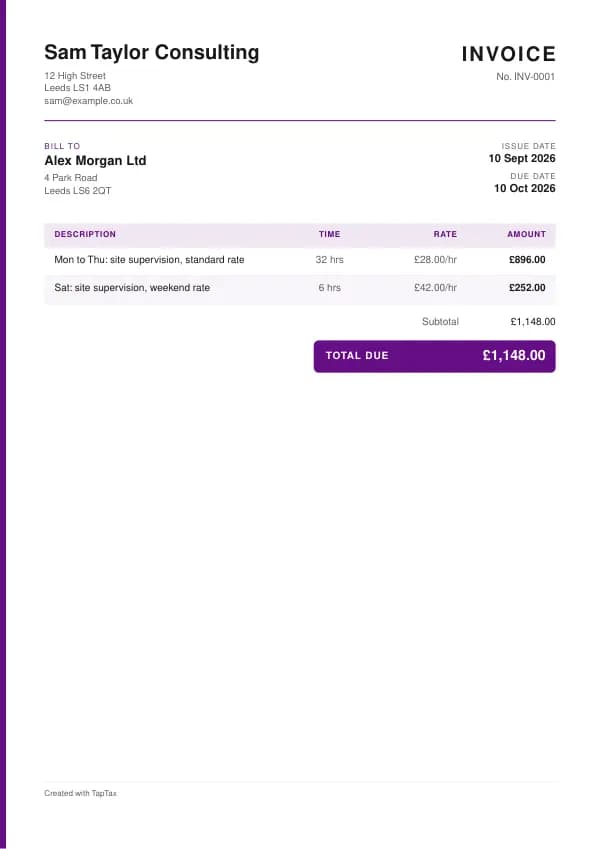
The template comes filled in with example lines like these, so you can see how each part works before replacing them with your own.
| Line | Quantity | Price | Amount |
|---|---|---|---|
| Mon to Thu: site supervision, standard rate | 32 hours | £28.00 | £896.00 |
| Sat: site supervision, weekend rate | 6 hours | £42.00 | £252.00 |
| Subtotal | £1,148.00 | ||
| Total due | £1,148.00 |
Line by line: Mon to Thu: site supervision, standard rate, 32 hours × £28.00 = £896.00; Sat: site supervision, weekend rate, 6 hours × £42.00 = £252.00. The subtotal is £1,148.00, which is also the total due because no VAT is charged. The figures are illustrative; replace them with your own.
How to fill in the template
- Fill in your timesheet each day and get it approved at the end of the week or month.
- Copy the approved hours onto the invoice, day by day.
- Apply your standard, overtime or weekend rates as agreed.
- Quote the timesheet reference and approver.
- Attach the approved timesheet and add VAT if you are registered.
- Send it by the agency's cut-off day so it goes into the next pay run.
Give each timesheet invoice its own number in a single sequence, and never reuse one. A number lets you and your customer refer to the document without confusion, and an unbroken sequence shows your records are complete. The invoice number generator suggests a format that stays tidy for years.
Agencies and employment status
If an agency supplies you to a client and you are subject to supervision, direction or control over how you do the work, the agency may have to treat you as an employee for tax and deduct PAYE, even if you are self-employed elsewhere. Genuinely self-employed contractors who decide how the work is done can invoice as a business. Check your status with the agency before the assignment starts and make sure your invoices reflect the arrangement they operate. HMRC's employment status guidance explains the tests, and the answer can differ from one assignment to the next.
Income thresholds that change your paperwork
- Trading allowance£1,000
- MTD from April 2028£20,000
- MTD from April 2027£30,000
- MTD from April 2026£50,000
- VAT registration£90,000
Timesheet invoice or timesheet?
A timesheet records the hours; the client approves it. The timesheet invoice bills those approved hours. Many agencies need both: the timesheet for approval and the invoice for payment. Keep them numbered so each invoice points to its timesheet.
Matching the timesheet exactly
Accounts teams reject invoices that do not match the approved timesheet, even by a quarter of an hour. Copy the approved figures directly, use the same week-ending date, and quote the timesheet reference. If you worked extra hours that were not approved, get the timesheet amended and re-approved first, rather than adding them to the invoice. One invoice per timesheet keeps the matching simple.
Overtime, weekends and rates
Show each rate as a separate line: standard hours, overtime, weekends, bank holidays, and any on-call or sleep-in rates. State the rates in your assignment terms before starting, and quote them on the invoice. If the rate changes during an assignment, split the invoice at the change date. For day-rate contracts, show days worked and any half days, and agree what counts as a day.
Agency payment runs
Most agencies pay weekly or monthly, with a cut-off day for approved timesheets and invoices. Miss the cut-off and your payment slips to the next run. Find out the cut-off and payment day at the start, send your invoice as soon as the timesheet is approved, and keep a list of submitted invoices with the date they should be paid, so you can chase quickly if one is missed.
Expenses on timesheet invoices
If the assignment allows expenses, such as travel between sites or accommodation, list them on separate lines with receipts attached, following the agency's rules. Ordinary commuting to a permanent workplace is not usually recharged or allowable. If you are VAT registered, recharged expenses are generally part of your supply and carry VAT at the standard rate on the net cost.
Records and tax
Keep the approved timesheets with your invoices: they are evidence of the work and your income. If you work mainly through agencies, check your tax position on each assignment, and keep records of any assignment where tax was deducted, so it is credited on your Self Assessment return. If you are paid gross as a self-employed contractor, set money aside for tax each month.
Worked example
A site supervisor working through an agency at £28 an hour, and £42 an hour at weekends, works 32 hours Monday to Thursday and 6 hours on Saturday. The site manager approves timesheet TS-0412 on Monday morning. The invoice lists the two rates on separate lines, 32 hours at £28 (£896) and 6 hours at £42 (£252), totalling £1,148, quotes the timesheet reference and approver, and attaches a copy. It goes to the agency before its Tuesday cut-off, so it is paid in that Friday's run.
Common timesheet invoice mistakes
- Invoicing hours that differ from the approved timesheet. Get the timesheet amended first.
- Missing the agency's cut-off day. Submit as soon as the timesheet is approved.
- Assuming agency work is always self-employment. Check how the agency treats the assignment.
Checklist before you send it
Before a timesheet invoice goes out, check it against the list of what it must show:
- A unique invoice number and date is on it and correct.
- Your details and the agency or client's is on it and correct.
- The timesheet reference and approver is on it and correct.
- The week or period covered is on it and correct.
- Each day or shift with the hours or days worked is on it and correct.
- Your rate, including any overtime or weekend rate is on it and correct.
- VAT if you are registered, and the total is on it and correct.
- A copy is saved with your records.
Sending it
Send the timesheet invoice as a PDF attached to an email, not as an editable file. In the email, say what it is, its number, the amount and any date that matters, so the reader can act without opening the attachment. Send it to the person or inbox that deals with it, which for a business is often an accounts address rather than the person you worked with, and keep a copy of the email and the PDF together in your records.
Keep a copy
You must keep your records for at least 5 years after the 31 January submission deadline of the relevant tax year.
Keep a copy of every timesheet invoice you issue or receive, digital is fine, with the payments that relate to it. From 6 April 2026, sole traders and landlords with qualifying income over £50,000 must keep digital records and send HMRC quarterly updates under Making Tax Digital, falling to £30,000 from April 2027 and £20,000 from April 2028. The MTD requirement checker shows when it applies to you, and how long to keep invoices covers retention.
Download the timesheet invoice template
The template comes as a Word document for Word, Google Docs and Pages, an Excel workbook for Excel and Google Sheets, and a print-ready PDF. Replace the words in square brackets with your own details. In the Excel version each line, the subtotal and the total are formulas, so the figures update as you type. Or fill it in online with the free invoice generator, which makes a finished PDF with your details, in your colours.
Related documents in the same family: the deposit invoice template, interim invoice template, stage payment invoice template, final invoice template and retainer invoice template. All of them follow the same numbering and record-keeping rules, and each page explains what that document must show.
A TapTax account, free to start, creates and sends invoices, tracks which are paid, keeps receipts and bills with your records, and files your quarterly updates to HMRC from the same data.
Tools for this
Related guides and definitions
Frequently asked questions
What is a timesheet invoice?
An invoice that bills the hours or days on a timesheet the client or agency has approved.
Do I attach the timesheet to the invoice?
Usually yes, or quote its reference, so the accounts team can match them.
Can I invoice an agency if I am self-employed?
If the agency treats you as self-employed for that assignment. Where you work under supervision, direction or control, the agency may have to treat you as employed for tax.
Invoice, get paid, stay ready for HMRC.
TapTax creates and sends your invoices, tracks which ones are paid and files your quarterly updates to HMRC. Start on the free plan, no card needed.
Get started freeSources
The rules on this page come from official guidance.