
Timesheet
template
A weekly timesheet for recording hours by day and task, ready for approval and invoicing.
Download the timesheet template
Free, with no sign-up. Replace the words in square brackets with your own details.
A timesheet is the evidence behind any bill for time. Contractors use them to invoice clients and agencies; employers use them to pay staff correctly. A good timesheet shows start and finish times, breaks, the hours for each day and task, and the approval. This template does that in a weekly layout, and the Excel version totals the hours for you.
- Timesheet
- A record of the hours worked each day over a week or month, usually by task or project, signed off by the worker and approved by a client, agency or manager.
When to use a timesheet
Use a timesheet whenever you bill or pay by the hour: freelancers billing clients, contractors on agency assignments, sole traders with part-time staff, or anyone tracking time across projects to see where it goes. Fill it in daily, not from memory at the end of the week, and get it approved promptly. For contractors, the approved timesheet then becomes a timesheet invoice.
What a timesheet must show
| What it shows | Why it matters |
|---|---|
| The worker's name and the week or period | Whose time and when |
| The client, project or site | What the time was spent on |
| For each day: start time, finish time and breaks | How the hours were worked |
| Hours worked each day, by task if billing by task | The daily total |
| Total hours for the period, split by rate if rates differ | What to bill or pay |
| The worker's signature and date | Confirms the hours |
| Approver's name, signature and date | Confirms the hours are agreed |
An example timesheet
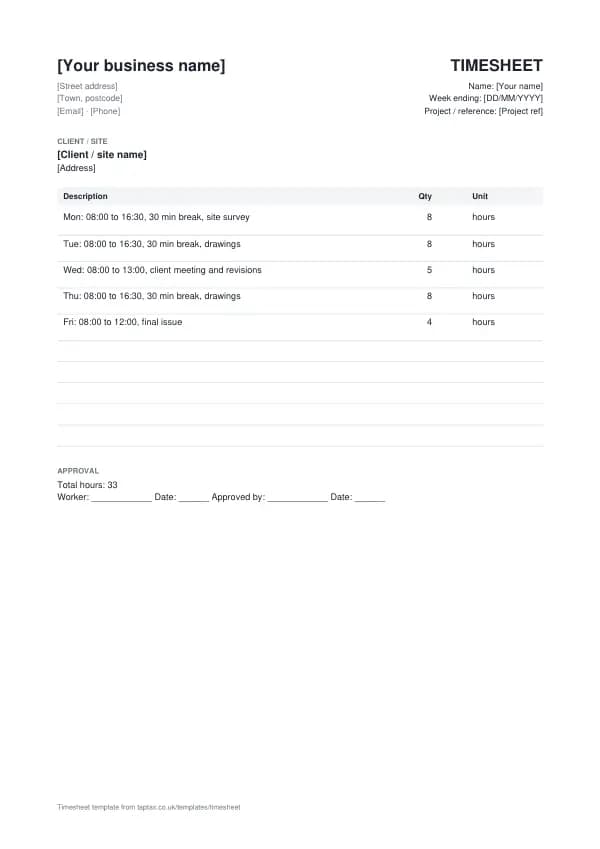
The template comes filled in with example lines like these, so you can see how each part works before replacing them with your own.
| Item | Quantity |
|---|---|
| Mon: 08:00 to 16:30, 30 min break, site survey | 8 hours |
| Tue: 08:00 to 16:30, 30 min break, drawings | 8 hours |
| Wed: 08:00 to 13:00, client meeting and revisions | 5 hours |
| Thu: 08:00 to 16:30, 30 min break, drawings | 8 hours |
| Fri: 08:00 to 12:00, final issue | 4 hours |
How to fill in the template
- Fill in your name, the week and the project or client.
- Each day, record start and finish times and any breaks.
- Enter the hours worked and what they were spent on.
- Total the hours at the end of the week, split by rate if needed.
- Sign it and send it for approval.
- Use the approved timesheet to invoice or run payroll.
Give each timesheet its own number in a single sequence, and never reuse one. A number lets you and your customer refer to the document without confusion, and an unbroken sequence shows your records are complete. The invoice number generator suggests a format that stays tidy for years.
Timesheets for employers
If you employ staff, you must pay at least the National Minimum Wage or National Living Wage for the hours they work, and keep records that show you do. Timesheets are the simplest way to do that for hourly-paid and variable-hours staff. Record actual start and finish times and breaks, not just totals, because the minimum wage is checked against the hours actually worked, including time spent on required training and some travel between assignments. HMRC enforces the minimum wage and can ask to see the records.
Income thresholds that change your paperwork
- Trading allowance£1,000
- MTD from April 2028£20,000
- MTD from April 2027£30,000
- MTD from April 2026£50,000
- VAT registration£90,000
Timesheet or timesheet invoice?
The timesheet records hours and is approved by the client or manager. A timesheet invoice bills those approved hours. For employees, the timesheet feeds payroll rather than an invoice.
Filling it in daily
Timesheets filled in at the end of the week from memory are rarely accurate, and small errors add up to lost income or disputes. Record your times at the end of each day, or as you switch tasks. A phone timer, a spreadsheet, or a notebook in the van all work. The accuracy is what makes the timesheet useful, both for billing and for understanding how long jobs really take.
Tracking time by task
Breaking the day into tasks, such as survey, drawings and meetings, shows the client exactly what they are paying for and helps you price the next job. If you bill different rates for different work, such as site work and office work, or standard and overtime hours, record them separately. For fixed-price jobs, tracking time by task shows whether the price was right.
Approval
Get timesheets approved promptly, ideally at the end of each week, by someone with authority to approve the hours. Agree who that is at the start. Approval turns a record into an agreement: once the client has approved the hours, disputes about them are rare. If the approver changes some hours, ask why and record the reason, so the same issue does not come up next week.
Timesheets and employment status
Recording hours does not make a contractor an employee, but being told which hours to work, how, and under close supervision can point that way. If you are self-employed, your timesheet records time spent for billing, not hours set by the client. Agencies may treat workers under supervision, direction or control as employed for tax. HMRC's employment status guidance explains the tests.
Worked example
A freelance architectural technician works on a single project for a week: a full day on a site survey, two days on drawings, a half day for a client meeting and a morning issuing the final set. Their timesheet shows 33 hours, split by task, with start, finish and break times. The client approves it on Friday. Their invoice bills 33 hours at their rate, quoting the timesheet and approver, and their own records show the drawings took longer than quoted, which feeds into the next quote.
Keeping timesheets
Keep approved timesheets with the invoices or payslips they support. For contractors, they are evidence of income; for employers, they are evidence of pay and minimum wage compliance. Keep them at least as long as your other business records: five years after the 31 January submission deadline of the relevant tax year for self-employed records, and longer for payroll where required.
Timesheets in Excel
The Excel version of this template adds up the week's hours with a live formula, so you only enter each day's hours and the total updates as you type. Keep one workbook per client or per month, with a sheet per week, and copy the approved totals onto your invoice. If you need start and finish times to calculate the hours, add columns for them and a formula for the difference minus breaks. Save each approved week as a PDF before invoicing, so the approved version cannot change later.
Common timesheet mistakes
- Filling it in at the end of the week from memory. Record times daily as you work.
- Totals only, no start and finish times. Record the times and breaks; totals alone are easier to dispute.
- Waiting weeks for approval. Get each timesheet approved promptly so invoicing is not delayed.
Checklist before you send it
Before a timesheet goes out, check it against the list of what it must show:
- The worker's name and the week or period is on it and correct.
- The client, project or site is on it and correct.
- For each day: start time, finish time and breaks is on it and correct.
- Hours worked each day, by task if billing by task is on it and correct.
- Total hours for the period, split by rate if rates differ is on it and correct.
- The worker's signature and date is on it and correct.
- Approver's name, signature and date is on it and correct.
- A copy is saved with your records.
Sending it
Send the timesheet as a PDF attached to an email, not as an editable file. In the email, say what it is, its number, the amount and any date that matters, so the reader can act without opening the attachment. Send it to the person or inbox that deals with it, which for a business is often an accounts address rather than the person you worked with, and keep a copy of the email and the PDF together in your records.
Keep a copy
You must keep your records for at least 5 years after the 31 January submission deadline of the relevant tax year.
Keep a copy of every timesheet you issue or receive, digital is fine, with the payments that relate to it. From 6 April 2026, sole traders and landlords with qualifying income over £50,000 must keep digital records and send HMRC quarterly updates under Making Tax Digital, falling to £30,000 from April 2027 and £20,000 from April 2028. The MTD requirement checker shows when it applies to you, and how long to keep invoices covers retention.
Download the timesheet template
The template comes as a Word document for Word, Google Docs and Pages, an Excel workbook for Excel and Google Sheets, and a print-ready PDF. Replace the words in square brackets with your own details.
Related documents in the same family: the delivery note template, job sheet template and work order template. All of them follow the same numbering and record-keeping rules, and each page explains what that document must show.
A TapTax account, free to start, creates and sends invoices, tracks which are paid, keeps receipts and bills with your records, and files your quarterly updates to HMRC from the same data.
Tools for this
Related guides and definitions
Frequently asked questions
What should a timesheet include?
The worker, period, client or project, start and finish times and breaks for each day, hours by task, totals, and signatures.
Do employers have to keep timesheets?
Employers must keep records showing they pay at least the minimum wage. Timesheets are the usual way for hourly and variable-hours staff.
Can I use a timesheet as an invoice?
No. The timesheet records hours; a timesheet invoice bills them.
Invoice, get paid, stay ready for HMRC.
TapTax creates and sends your invoices, tracks which ones are paid and files your quarterly updates to HMRC. Start on the free plan, no card needed.
Get started freeSources
The rules on this page come from official guidance.