
Job sheet
template
A job sheet to record the work done, time on site, parts used and the customer's sign-off.
Download the job sheet template
Free, with no sign-up. Replace the words in square brackets with your own details.
A job sheet turns a day's work into an invoice without guesswork. It records arrival and departure times, the work done, parts used, and anything the customer needs to know, and the customer signs it before you leave. That signature settles most later disputes about hours or materials. This template lays out each part, and the items carry straight onto your invoice.
- Job sheet
- A record completed on site for each job or visit, showing what was done, when, how long it took, the parts and materials used, and the customer's signature confirming the work.
When to use a job sheet
Use a job sheet for every call-out or site visit: plumbing and heating repairs, electrical work, appliance servicing, maintenance for landlords and letting agents, IT support visits, cleaning jobs with extras. It is especially useful where you bill time and materials, where someone other than the customer will pay (an insurer, landlord or agent), or where several people work on the same job. For a job set up in advance with instructions, the work order comes first and the job sheet records what happened.
What a job sheet must show
| What it shows | Why it matters |
|---|---|
| A job number and date | Identifies the visit |
| The customer's name, site address and contact | Where the work was done |
| Arrival and departure times | The time to bill |
| A description of the fault or request and the work done | What was done |
| Parts and materials used, with quantities | What to charge for |
| Further work recommended | Follow-up and advice given |
| The customer's signature and name | Confirms the work and time |
An example job sheet
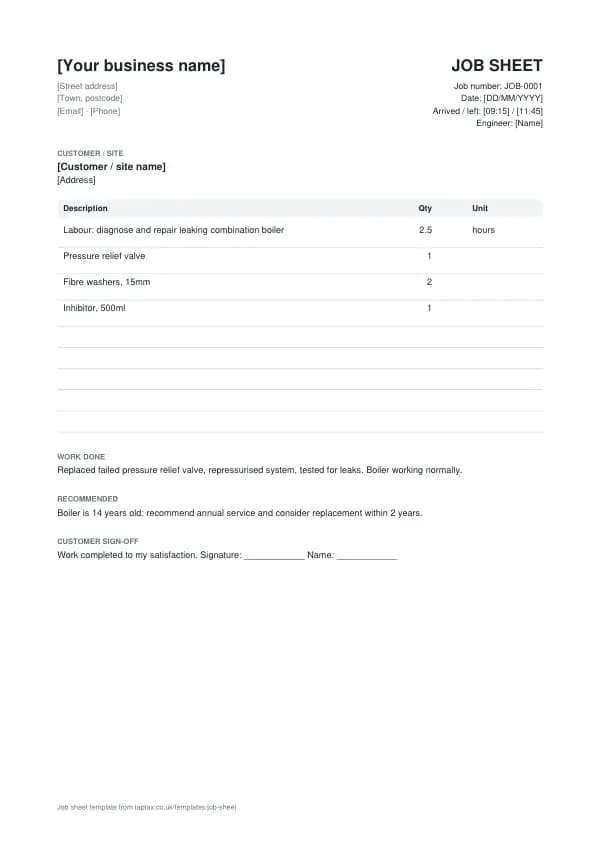
The template comes filled in with example lines like these, so you can see how each part works before replacing them with your own.
| Item | Quantity |
|---|---|
| Labour: diagnose and repair leaking combination boiler | 2.5 hours |
| Pressure relief valve | 1 |
| Fibre washers, 15mm | 2 |
| Inhibitor, 500ml | 1 |
How to fill in the template
- Start a job sheet when you arrive, with the job number, date and time.
- Record the fault or request as the customer describes it.
- Describe the work done and list every part and material used.
- Note any further work you recommend and advice given.
- Record your departure time.
- Ask the customer to check and sign, then invoice from the sheet.
Number every job sheet in sequence and never reuse a number, even when a document is cancelled. Numbers make documents easy to find and to match against payments, and they show HMRC and your customers that nothing is missing. For a numbering format, try the invoice number generator.
Job sheets and safety records
Some work carries its own record-keeping duties beyond a job sheet. Gas work must be carried out by a Gas Safe registered engineer, and landlords need an annual gas safety record for each appliance. Electrical installation work needs the appropriate certificate or notification under the building regulations. A job sheet does not replace those certificates, but it should reference them, so the paperwork for each visit is linked. If you work in a regulated trade, keep your job sheets with your certificates for the same period.
Income thresholds that change your paperwork
- Trading allowance£1,000
- MTD from April 2028£20,000
- MTD from April 2027£30,000
- MTD from April 2026£50,000
- VAT registration£90,000
Job sheet or work order?
A work order is the instruction to do the job, raised before the visit. A job sheet records what actually happened on the visit. Many businesses use both: the work order sets out the request and authorised budget, and the job sheet shows the work done and parts used.
From job sheet to invoice
Invoice from the job sheet the same day, while details are fresh. Transfer the labour time, rounded to your agreed increment, and each part at your price, quoting the job number. If the customer signed the sheet, mention that on the invoice or attach a copy. For landlords and agents, the job sheet is often required with the invoice before they will pay.
Parts and materials
Record every part and consumable used, not just the major ones: washers, fittings and inhibitor add up. Note the part numbers for anything the customer might need again. If you use stock from your van, the job sheet tells you what to reorder. Where a customer supplies parts, note that too, so you do not charge for them and your warranty position is clear.
Third-party payers
When a letting agent, landlord, insurer or warranty company is paying, the job sheet needs their reference, the authorised limit, and the tenant's or policyholder's signature as confirmation. Stay within the authorised amount unless you get approval to exceed it, and record who gave it. Third-party payers often reject invoices that do not match their job reference or authorised scope.
Digital job sheets
Job management apps let you fill in job sheets on a phone, add photos, capture a signature and email the customer a copy before you leave. They also turn job sheets into invoices automatically. Whatever you use, the content is the same: times, work done, parts, and sign-off. Photos of the fault and the finished work are worth adding for any job that might be disputed.
Worked example
A heating engineer arrives at 9:15 to a leaking boiler, replaces a pressure relief valve and two washers, adds inhibitor and leaves at 11:45. The job sheet records 2.5 hours, the parts, the work done and a recommendation to service the boiler annually. The customer signs. The invoice that afternoon charges 2.5 hours at the hourly rate plus the parts, quoting JOB-0214, and is paid the same week without question, because every line matches what the customer signed.
Keeping job sheets
Job sheets are part of your business records. They support your income, show how each invoice was calculated, and help if a customer disputes the work or a fault returns. Keep them with the invoice for at least five years after the 31 January deadline of the relevant tax year, and longer where they support safety certificates or warranties.
Callbacks and warranty visits
When you return to a job to fix a problem with your own work, record it on a new job sheet marked as a warranty or callback visit, linked to the original job number. Note what was found and done, and that no charge applies, or the charge if the fault was not yours. A clear record shows how you handled the callback if the customer later complains, and your records show how often callbacks happen, which is worth knowing for pricing and quality.
Job sheets and the customer's questions
Customers often ask weeks later what was done, which part was fitted, or whether an appliance was checked. A job sheet with clear notes answers in seconds. Use plain language the customer will understand, add part numbers and readings where relevant, and write any advice you gave, such as recommending a replacement. It builds trust and brings repeat work.
Common job sheet mistakes
- Filling in the sheet from memory later. Record times and parts on site, as you go.
- No customer signature. Without it, hours and parts are easier to dispute.
- Leaving small parts off. Washers and consumables add up; record everything used.
Checklist before you send it
A quick check of every job sheet before you send it:
- A job number and date is on it and correct.
- The customer's name, site address and contact is on it and correct.
- Arrival and departure times is on it and correct.
- A description of the fault or request and the work done is on it and correct.
- Parts and materials used, with quantities is on it and correct.
- Further work recommended is on it and correct.
- The customer's signature and name is on it and correct.
- A copy is saved with your records.
Sending it
Email the job sheet as a PDF with a short, specific message: the document number, the amount, and what you need the reader to do. Address it to whoever processes it, often an accounts team, and copy your usual contact if that helps. File the sent PDF with its number in the file name, so you can find it in seconds if there is ever a question.
Keep a copy
You must keep your records for at least 5 years after the 31 January submission deadline of the relevant tax year.
Business documents are records, and records have to be kept. Save every job sheet in one place, ideally digitally, so you can find it if a customer or HMRC asks. Making Tax Digital for Income Tax makes digital records compulsory from 6 April 2026 for qualifying income over £50,000, from April 2027 over £30,000 and from April 2028 over £20,000; check your date with the MTD requirement checker.
Download the job sheet template
Download it as a Word document, an Excel workbook or a PDF, whichever suits the way you work. The Word file opens in Google Docs too, and the Excel file in Google Sheets.
Related documents in the same family: the delivery note template, work order template and timesheet template. All of them follow the same numbering and record-keeping rules, and each page explains what that document must show.
If you would rather not manage documents by hand, a TapTax account, free to start, keeps your invoices, receipts and bank transactions together and files your Making Tax Digital quarterly updates to HMRC.
Tools for this
Related guides and definitions
Frequently asked questions
What is a job sheet?
A record of a job or visit showing the work done, time on site, parts used and the customer's sign-off.
Should the customer sign the job sheet?
Yes. Their signature confirms the work and time, and settles most later disputes.
Is a job sheet an invoice?
No. It records the work; the invoice charges for it, and should quote the job number.
Invoice, get paid, stay ready for HMRC.
TapTax creates and sends your invoices, tracks which ones are paid and files your quarterly updates to HMRC. Start on the free plan, no card needed.
Get started freeSources
The rules on this page come from official guidance.