
Hourly invoice
template
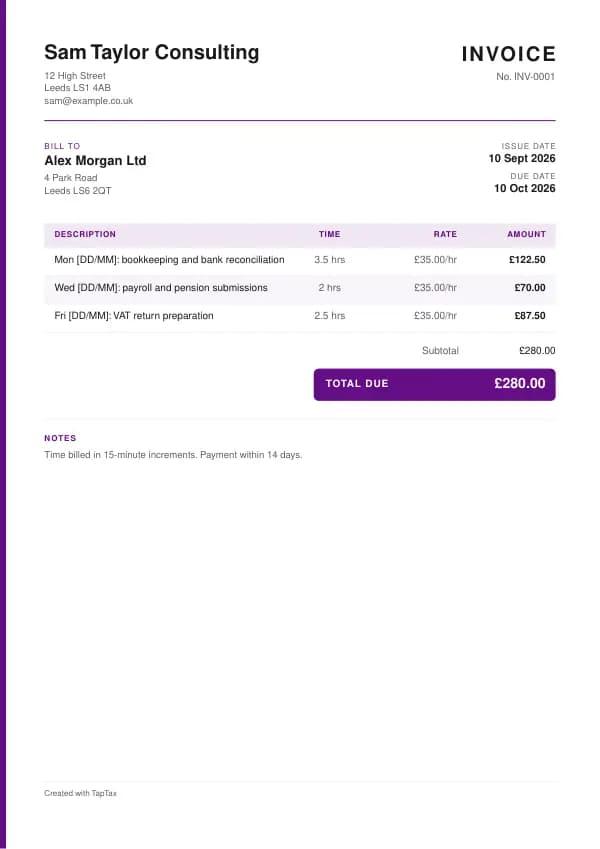
An invoice for time worked, with dates, hours, rate and a clear description of each piece of work.
Download the hourly invoice template
Free, with no sign-up. Replace the words in square brackets with your own details.
The free invoice generator makes a finished PDF with your details, logo and colours. Nothing is stored.
Hourly billing is the simplest pricing for work whose size is hard to predict: repairs, consulting, tutoring, admin support, development, cleaning. The invoice has one job: to make the time easy to check. This template lists each date or task with its hours, applies your rate, and totals it, with VAT if you are registered. In the Excel version each line is a formula, so changing the hours updates the total.
- Hourly invoice
- An invoice that charges for time spent, showing the hours worked, the hourly rate and what was done, usually over a week or a month.
When to use a hourly invoice
Use an hourly invoice when you and your customer agreed to pay for time: a freelancer billing a client weekly, a tutor billing a parent monthly, a handyman billing a landlord for small jobs, or a consultant billing a project. Agree the rate, the billing increment (whole hours, half hours or 15 minutes), and whether travel time is chargeable before you start. If the customer's system needs a signed timesheet, use a timesheet invoice instead.
What a hourly invoice must show
| What it shows | Why it matters |
|---|---|
| A unique invoice number, date and due date | Identifies the invoice |
| Your details and the customer's | Who is billing and who pays |
| The period covered | Which week or month |
| Each date or task with the hours spent | So the time can be checked |
| Your hourly rate | As agreed in advance |
| The total, with VAT if you are registered | What is due |
| Any expenses charged, listed separately | Kept apart from time |
An example hourly invoice
The template comes filled in with example lines like these, so you can see how each part works before replacing them with your own.
| Line | Quantity | Price | Amount |
|---|---|---|---|
| Mon [DD/MM]: bookkeeping and bank reconciliation | 3.5 hours | £35.00 | £122.50 |
| Wed [DD/MM]: payroll and pension submissions | 2 hours | £35.00 | £70.00 |
| Fri [DD/MM]: VAT return preparation | 2.5 hours | £35.00 | £87.50 |
| Subtotal | £280.00 | ||
| Total due | £280.00 |
Line by line: Mon [DD/MM]: bookkeeping and bank reconciliation, 3.5 hours × £35.00 = £122.50; Wed [DD/MM]: payroll and pension submissions, 2 hours × £35.00 = £70.00; Fri [DD/MM]: VAT return preparation, 2.5 hours × £35.00 = £87.50. The subtotal is £280.00, which is also the total due because no VAT is charged. The figures are illustrative; replace them with your own.
How to fill in the template
- Record your time as you work, with the date, task and hours.
- Group the time for the period on the invoice, one line per day or task.
- Apply your agreed hourly rate.
- List any expenses separately.
- Add VAT if you are registered, and the total.
- Send it on your agreed billing day, weekly or monthly.
Number every hourly invoice in sequence and never reuse a number, even when a document is cancelled. Numbers make documents easy to find and to match against payments, and they show HMRC and your customers that nothing is missing. For a numbering format, try the invoice number generator.
Setting your hourly rate
An hourly rate has to cover more than the time you bill. Allow for unbillable time (admin, quoting, travel, learning), holidays and sickness, business costs, and your tax and National Insurance. As a sole trader you might bill only 60% to 70% of your working hours. Work backwards from the income you need: divide your target annual income plus costs by the billable hours you realistically expect. The day rate calculator and salary to hourly calculator do the arithmetic, including tax.
Income thresholds that change your paperwork
- Trading allowance£1,000
- MTD from April 2028£20,000
- MTD from April 2027£30,000
- MTD from April 2026£50,000
- VAT registration£90,000
Hourly invoice or fixed-price invoice?
Hourly billing charges for time; fixed pricing charges for the result. Hourly suits uncertain scope and protects you from overruns; fixed pricing rewards efficiency and gives customers certainty. Many freelancers quote fixed prices for well-defined work and bill hourly for changes. For ongoing work, a retainer invoice combines both.
Tracking time accurately
Keep a record as you go, not from memory at the end of the month: a timer app, a spreadsheet, or a notebook with start and finish times. Note what you did as well as how long it took, because customers query hours they do not understand. Round consistently, in the increment you agreed, and never round in a way that would surprise the customer. Good time records also help you price future jobs, because you will know how long things really take.
Describing the work
A line such as "Consulting, 6 hours" invites questions; "Workshop prep and slide deck for Q3 plan, 6 hours" does not. Use the customer's own project names or references, split long days into the tasks that filled them, and quote any purchase order number. For regular work, a consistent format helps the customer approve the invoice quickly each time.
Travel time and expenses
Say in advance whether travel time is billable, at the full rate, a reduced rate, or not at all. Show travel time as its own line. Expenses such as mileage, parking or materials should be listed separately from time, and for VAT they are usually part of your charge to the customer, so VAT applies to them at the standard rate if you are registered. The expenses recharge invoice explains the rules.
Minimum charges and call-outs
Trades and repair businesses often set a minimum charge, such as the first hour, or a call-out fee that covers travel and the first part of the job. Put it on the quote or your website and show it as a separate line on the invoice. It avoids unprofitable short visits and makes the pricing clear before you arrive.
Keeping records for tax
Your hourly invoices are your sales records for Self Assessment, and from April 2026 for Making Tax Digital if your qualifying income is over £50,000. Keep your time records too: they back up the invoices if a customer disputes the hours, and they show how your income was earned. If you work mostly for one client for fixed hours, review your employment status, because HMRC looks at how the work is done, not just how it is billed.
Worked example
A freelance bookkeeper charges £35 an hour in 15-minute increments. In one week they spend 3 hours 20 minutes on bank reconciliation (rounded to 3.5 hours), 2 hours on payroll and 2 hours 25 minutes on a VAT return (rounded to 2.5 hours). The invoice shows 8 hours at £35, a total of £280. They are not VAT registered, so no VAT is added. Over a year of similar weeks, the invoices add up to about £14,500 of income, which, with other income, tells them whether they need to register for Making Tax Digital and how close they are to the VAT threshold.
Common hourly invoice mistakes
- Vague line descriptions. Say what was done, not just "work", so the hours are easy to approve.
- Unagreed rounding or travel time. Agree both before you start and apply them consistently.
- Mixing expenses into the hours. List expenses separately from time.
Checklist before you send it
A quick check of every hourly invoice before you send it:
- A unique invoice number, date and due date is on it and correct.
- Your details and the customer's is on it and correct.
- The period covered is on it and correct.
- Each date or task with the hours spent is on it and correct.
- Your hourly rate is on it and correct.
- The total, with VAT if you are registered is on it and correct.
- Any expenses charged, listed separately is on it and correct.
- A copy is saved with your records.
Sending it
Email the hourly invoice as a PDF with a short, specific message: the document number, the amount, and what you need the reader to do. Address it to whoever processes it, often an accounts team, and copy your usual contact if that helps. File the sent PDF with its number in the file name, so you can find it in seconds if there is ever a question.
Keep a copy
You must keep your records for at least 5 years after the 31 January submission deadline of the relevant tax year.
Business documents are records, and records have to be kept. Save every hourly invoice in one place, ideally digitally, so you can find it if a customer or HMRC asks. Making Tax Digital for Income Tax makes digital records compulsory from 6 April 2026 for qualifying income over £50,000, from April 2027 over £30,000 and from April 2028 over £20,000; check your date with the MTD requirement checker.
Download the hourly invoice template
Download it as a Word document, an Excel workbook or a PDF, whichever suits the way you work. The Word file opens in Google Docs too, and the Excel file in Google Sheets. The Excel totals are live formulas. Or fill it in online with the free invoice generator, which makes a finished PDF with your details, in your colours.
Related documents in the same family: the deposit invoice template, interim invoice template, stage payment invoice template, final invoice template and retainer invoice template. All of them follow the same numbering and record-keeping rules, and each page explains what that document must show.
If you would rather not manage documents by hand, a TapTax account, free to start, keeps your invoices, receipts and bank transactions together and files your Making Tax Digital quarterly updates to HMRC.
Tools for this
Related guides and definitions
Frequently asked questions
How do I invoice for hours worked?
List each date or task with its hours, apply your agreed hourly rate, add any expenses separately, and total it with VAT if registered.
Should I round my hours?
Only in the increment you agreed with the customer, such as 15 minutes, and consistently.
Can I charge for travel time?
If you agreed it in advance. Show it as its own line.
Invoice, get paid, stay ready for HMRC.
TapTax creates and sends your invoices, tracks which ones are paid and files your quarterly updates to HMRC. Start on the free plan, no card needed.
Get started freeSources
The rules on this page come from official guidance.