
Retainer invoice
template
A recurring invoice for a monthly retainer, with the hours included and how extra work is billed.
Download the retainer invoice template
Free, with no sign-up. Replace the words in square brackets with your own details.
The free invoice generator makes a finished PDF with your details, logo and colours. Nothing is stored.
A retainer turns project work into predictable income. The client pays a set fee each month for a block of hours, a defined service, or your availability, and you invoice it on the same day every month. This template shows the retainer period, what is included, any extra hours used beyond it, and how unused time is treated, so the monthly invoice needs no explaining.
- Retainer invoice
- An invoice for a fixed, recurring fee that secures your availability or a set amount of work each period, usually monthly, whether or not all of it is used.
When to use a retainer invoice
Use a retainer invoice for ongoing arrangements: a bookkeeper doing monthly books, a social media manager running accounts, a developer on call for site maintenance, a consultant available for a set number of days, or an accountant or lawyer billing a monthly fee. Invoice in advance at the start of each period, or in arrears at the end, as agreed. For one-off projects, use a deposit and final invoice instead; for pure time billing, an hourly invoice.
What a retainer invoice must show
| What it shows | Why it matters |
|---|---|
| A unique invoice number and date | Each month has its own invoice |
| Your details and the client's | Who is billing and who pays |
| The retainer period covered | Which month or quarter |
| What the retainer includes (hours or services) | The agreed scope |
| The fixed fee | The recurring charge |
| Any extra work beyond the retainer, itemised | Charged separately at the agreed rate |
| VAT if you are registered, and payment terms | The tax and due date |
An example retainer invoice
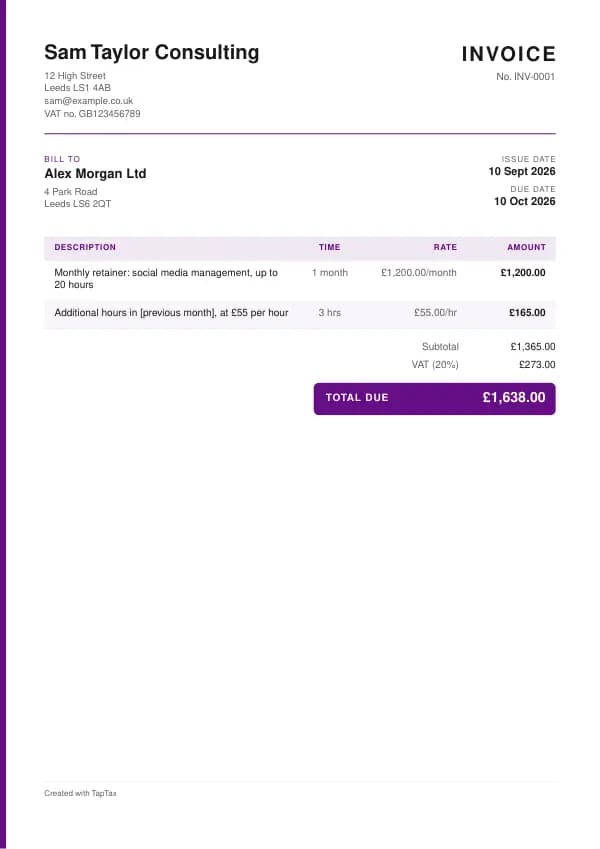
The template comes filled in with example lines like these, so you can see how each part works before replacing them with your own.
| Line | Quantity | Price | Amount |
|---|---|---|---|
| Monthly retainer: social media management, up to 20 hours | 1 month | £1,200.00 | £1,200.00 |
| Additional hours in [previous month], at £55 per hour | 3 hours | £55.00 | £165.00 |
| Subtotal | £1,365.00 | ||
| VAT at 20% | £273.00 | ||
| Total due | £1,638.00 |
Line by line: Monthly retainer: social media management, up to 20 hours, 1 month × £1,200.00 = £1,200.00; Additional hours in [previous month], at £55 per hour, 3 hours × £55.00 = £165.00. The subtotal is £1,365.00, VAT at 20% adds £273.00, and the total due is £1,638.00. The figures are illustrative; replace them with your own.
How to fill in the template
- Agree the fee, what it covers, the billing date and how extra or unused hours work.
- Invoice the retainer on the same day each period.
- Add any extra hours from the previous period at the agreed rate.
- Show hours used against the allowance so the client sees the value.
- Add VAT if you are registered.
- Offer a standing order or direct debit so payment arrives automatically.
Give each retainer invoice its own number in a single sequence, and never reuse one. A number lets you and your customer refer to the document without confusion, and an unbroken sequence shows your records are complete. The invoice number generator suggests a format that stays tidy for years.
VAT and tax points on retainers
Retainers are usually continuous supplies of services. For VAT, the tax point for each period is the earlier of the date you receive payment or the date you issue a VAT invoice. If you invoice in advance, VAT is due for the period the invoice falls in. Some businesses issue one VAT invoice covering a year of scheduled payments, listing each payment date and the VAT due on it; each tax point is then the earlier of a scheduled date or the payment. For Income Tax, on the cash basis you record the retainer when paid; on the traditional basis, in the period the service is provided.
Income thresholds that change your paperwork
- Trading allowance£1,000
- MTD from April 2028£20,000
- MTD from April 2027£30,000
- MTD from April 2026£50,000
- VAT registration£90,000
Retainer invoice or hourly invoice?
A retainer invoice charges a fixed fee each period, regardless of hours used within the allowance. An hourly invoice charges only for time actually worked. Retainers give both sides predictability; hourly billing suits irregular work.
Rollover and unused hours
Decide up front what happens to unused hours. Common options are no rollover (the fee pays for availability), rollover for one month only, or a cap on how many hours can build up. Unlimited rollover can leave you owing a large block of work at a busy time. Whatever you choose, show hours used against the allowance on every invoice, so the client sees what they are getting and there are no surprises at the end of a quarter.
Invoicing in advance or arrears
Invoicing in advance, on the first day of the period, is standard for retainers and protects your cash flow: the client pays before you do the work. Invoicing in arrears suits clients who want to see the work first, but leaves you carrying the risk. Extras beyond the retainer are normally billed in arrears, on the next month's invoice. Put the billing basis in your agreement and stick to it every month.
Setting a retainer price
Price a retainer from your hourly or day rate multiplied by the hours included, then consider a small discount for the guaranteed income and reduced admin. Remember the retainer should also cover time spent on calls, reporting and account management, not just delivery. Review the price once a year, and give notice of any increase in line with the agreement.
Retainers and employment status
A long-running retainer with one client, especially one with fixed hours, control over how you work, and no right to send a substitute, can start to look like employment. For sole traders, that matters because HMRC looks at the reality of the relationship, not the name on the invoice. Keep your independence visible: work for several clients, decide how and when the work is done, use your own equipment, and set out the service rather than your hours where possible.
Ending or changing a retainer
Build a notice period into the agreement, often one month, so neither side can stop overnight. When a retainer ends, issue a final invoice for any extra hours in the last period and, if you invoiced in advance and the client ends early under the agreement, a credit note for any unused portion you agreed to refund. Change the fee or scope only with written agreement, and show the new terms from the next invoice.
Common retainer invoice mistakes
- No rule for unused hours. Agree whether they roll over before the first invoice.
- Invoicing on a different date each month. A fixed date makes payment routine and predictable.
- Folding extras into the retainer figure. List extra hours separately at the agreed rate.
Checklist before you send it
Before a retainer invoice goes out, check it against the list of what it must show:
- A unique invoice number and date is on it and correct.
- Your details and the client's is on it and correct.
- The retainer period covered is on it and correct.
- What the retainer includes (hours or services) is on it and correct.
- The fixed fee is on it and correct.
- Any extra work beyond the retainer, itemised is on it and correct.
- VAT if you are registered, and payment terms is on it and correct.
- A copy is saved with your records.
Sending it
Send the retainer invoice as a PDF attached to an email, not as an editable file. In the email, say what it is, its number, the amount and any date that matters, so the reader can act without opening the attachment. Send it to the person or inbox that deals with it, which for a business is often an accounts address rather than the person you worked with, and keep a copy of the email and the PDF together in your records.
Keep a copy
You must keep your records for at least 5 years after the 31 January submission deadline of the relevant tax year.
Keep a copy of every retainer invoice you issue or receive, digital is fine, with the payments that relate to it. From 6 April 2026, sole traders and landlords with qualifying income over £50,000 must keep digital records and send HMRC quarterly updates under Making Tax Digital, falling to £30,000 from April 2027 and £20,000 from April 2028. The MTD requirement checker shows when it applies to you, and how long to keep invoices covers retention.
Download the retainer invoice template
The template comes as a Word document for Word, Google Docs and Pages, an Excel workbook for Excel and Google Sheets, and a print-ready PDF. Replace the words in square brackets with your own details. In the Excel version each line, the subtotal and the total are formulas, so the figures update as you type. Or fill it in online with the free invoice generator, which makes a finished PDF with your details, in your colours.
Related documents in the same family: the deposit invoice template, interim invoice template, stage payment invoice template, final invoice template and hourly invoice template. All of them follow the same numbering and record-keeping rules, and each page explains what that document must show.
A TapTax account, free to start, creates and sends invoices, tracks which are paid, keeps receipts and bills with your records, and files your quarterly updates to HMRC from the same data.
Tools for this
Related guides and definitions
Frequently asked questions
What is a retainer invoice?
A recurring invoice for a fixed fee that secures your availability or a set amount of work each period.
Should I invoice a retainer in advance?
Usually yes, on the first day of each period, with any extra hours billed in arrears on the next invoice.
When is VAT due on a retainer?
For each period, when you receive payment or issue a VAT invoice, whichever is earlier.
Invoice, get paid, stay ready for HMRC.
TapTax creates and sends your invoices, tracks which ones are paid and files your quarterly updates to HMRC. Start on the free plan, no card needed.
Get started freeSources
The rules on this page come from official guidance.