
Final invoice
template
The closing invoice for a job, showing the full price, variations, what has been paid and the balance.
Download the final invoice template
Free, with no sign-up. Replace the words in square brackets with your own details.
The free invoice generator makes a finished PDF with your details, logo and colours. Nothing is stored.
The final invoice closes the job. It brings together the original price, any extras agreed along the way, and everything already paid, so the customer can see exactly how the balance was reached. A clear final invoice gets paid; a confusing one gets queried. This template sets out the final account and the balance in one place.
- Final invoice
- The last invoice on a job, showing the total price including any agreed variations, the deposit and stage or interim payments already made, and the balance still due.
When to use a final invoice
Issue a final invoice when the work is complete, or at practical completion on a construction job, after taking a deposit or billing stages or interim amounts. Send it promptly, while the customer is pleased with the work. If you took no deposit or earlier payments, a normal invoice is all you need. If the contract has a retention, the final invoice may exclude the last part of it, which you invoice separately when the defects period ends.
What a final invoice must show
| What it shows | Why it matters |
|---|---|
| The heading "Final invoice", a unique number and date | Shows this closes the job |
| Your details and the customer's, and the job reference | Identifies the job |
| The original contract price | The starting point |
| Agreed variations, listed | Extras and omissions agreed during the job |
| Deposit and earlier invoices already paid, with their numbers | So nothing is charged twice |
| The balance due, with VAT on the balance if registered | What the customer pays now |
| Retention still held, and when it will be released | If the contract has one |
An example final invoice
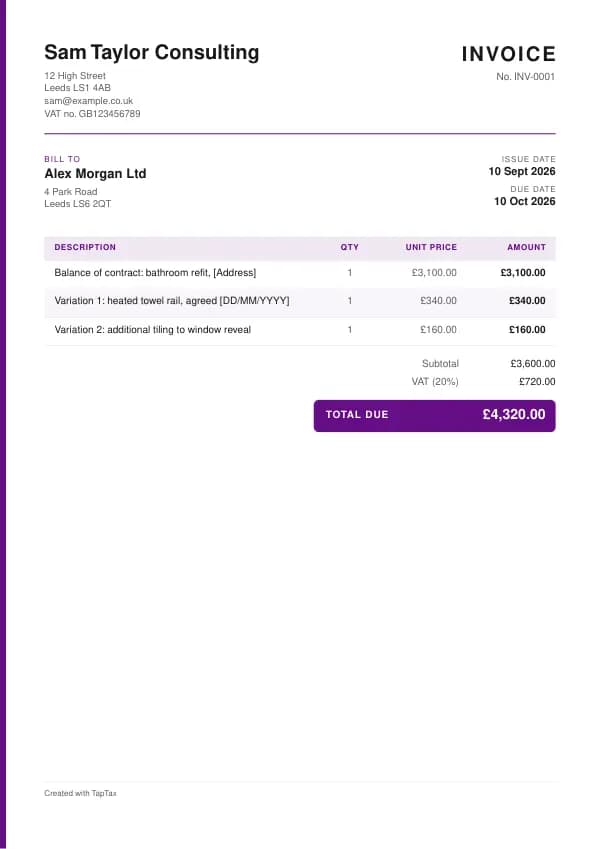
The template comes filled in with example lines like these, so you can see how each part works before replacing them with your own.
| Line | Quantity | Price | Amount |
|---|---|---|---|
| Balance of contract: bathroom refit, [Address] | 1 | £3,100.00 | £3,100.00 |
| Variation 1: heated towel rail, agreed [DD/MM/YYYY] | 1 | £340.00 | £340.00 |
| Variation 2: additional tiling to window reveal | 1 | £160.00 | £160.00 |
| Subtotal | £3,600.00 | ||
| VAT at 20% | £720.00 | ||
| Balance due | £4,320.00 |
Line by line: Balance of contract: bathroom refit, [Address], 1 × £3,100.00 = £3,100.00; Variation 1: heated towel rail, agreed [DD/MM/YYYY], 1 × £340.00 = £340.00; Variation 2: additional tiling to window reveal, 1 × £160.00 = £160.00. The subtotal is £3,600.00, VAT at 20% adds £720.00, and the balance due is £4,320.00. The figures are illustrative; replace them with your own.
How to fill in the template
- List the original contract price.
- Add each agreed variation, with its date and price.
- Deduct the deposit and every earlier invoice, quoting their numbers.
- Charge VAT on the balance only, if you are registered.
- Note any retention still held and when you will invoice its release.
- Send it promptly, with a thank you and the payment details.
Give each final invoice its own number in a single sequence, and never reuse one. A number lets you and your customer refer to the document without confusion, and an unbroken sequence shows your records are complete. The invoice number generator suggests a format that stays tidy for years.
VAT on the final invoice
If you are VAT registered, VAT on the deposit and each earlier stage or interim invoice has already been accounted for. The final invoice charges VAT only on the balance being billed now. Show the arithmetic so the customer can see VAT has not been charged twice: the contract price plus variations, less the net amounts already invoiced, gives the net balance, and VAT is added to that. Keep the VAT rate consistent with the earlier invoices, unless the rate changed during the job, in which case the tax point rules decide which rate applies to each part.
Fixed compensation for a late business payment
- Debt up to £999.99£40
- £1,000 to £9,999.99£70
- £10,000 or more£100
Final invoice or statement of account?
A final invoice charges the balance on one job. A statement of account lists every invoice, payment and credit across a customer's account over a period, without charging anything new. Send a statement when a customer has several unpaid invoices or asks what they owe overall.
Presenting the final account
A final account is a short schedule: the contract sum, additions (variations and extras), omissions (items taken out), the adjusted total, less payments to date, equals the balance. Presented that way, the customer can check every figure against what they agreed. Attach the variations log if there were more than a few changes. On construction jobs with a contract administrator, agree the final account with them before invoicing, so the invoice matches what they certify.
Snagging and retention
Customers sometimes hold back the final payment over small snags. Agree a snagging list at handover, fix the items quickly, and send the final invoice once they are cleared, or invoice with a small, agreed holdback for anything outstanding. On contracts with retention, the balance invoiced now excludes the part of the retention still held until the end of the defects period. Diary the release date and invoice it then.
Getting the final invoice paid
Final invoices are the ones most likely to be paid late, because the work is done and the customer has less reason to hurry. Send the invoice the day you finish, set a short payment term, make paying easy with bank details and a payment link, and follow up politely a few days before the due date. If it becomes overdue, business customers owe statutory interest and fixed compensation under the late payment legislation; the late payment interest calculator works them out.
Final invoices for CIS work
For CIS work, show the labour and materials in the final balance separately, just as on each earlier invoice, so the contractor deducts CIS from the right amount. The contractor's monthly statement will show the deduction on the final payment. If you are VAT registered and the domestic reverse charge applies, the final invoice carries the reverse charge wording instead of adding VAT.
Closing the job in your records
Once the final payment arrives, mark the job complete in your records with the total income, the invoice numbers, and any retention still due. Check that deposits and stage payments were each recorded once. If you use the traditional basis, work in progress at your year end is valued and included; on the cash basis, only the money received counts. A tidy closing record makes your tax return and any customer query easy.
Common final invoice mistakes
- Charging VAT on the full price again. VAT is due only on the balance being invoiced now.
- Not showing earlier payments. List the deposit and each earlier invoice by number.
- Adding variations nobody agreed. Only agreed variations belong on the final account.
Checklist before you send it
Before a final invoice goes out, check it against the list of what it must show:
- The heading "Final invoice", a unique number and date is on it and correct.
- Your details and the customer's, and the job reference is on it and correct.
- The original contract price is on it and correct.
- Agreed variations, listed is on it and correct.
- Deposit and earlier invoices already paid, with their numbers is on it and correct.
- The balance due, with VAT on the balance if registered is on it and correct.
- Retention still held, and when it will be released is on it and correct.
- A copy is saved with your records.
Sending it
Send the final invoice as a PDF attached to an email, not as an editable file. In the email, say what it is, its number, the amount and any date that matters, so the reader can act without opening the attachment. Send it to the person or inbox that deals with it, which for a business is often an accounts address rather than the person you worked with, and keep a copy of the email and the PDF together in your records.
Keep a copy
You must keep your records for at least 5 years after the 31 January submission deadline of the relevant tax year.
Keep a copy of every final invoice you issue or receive, digital is fine, with the payments that relate to it. From 6 April 2026, sole traders and landlords with qualifying income over £50,000 must keep digital records and send HMRC quarterly updates under Making Tax Digital, falling to £30,000 from April 2027 and £20,000 from April 2028. The MTD requirement checker shows when it applies to you, and how long to keep invoices covers retention.
Download the final invoice template
The template comes as a Word document for Word, Google Docs and Pages, an Excel workbook for Excel and Google Sheets, and a print-ready PDF. Replace the words in square brackets with your own details. In the Excel version each line, the subtotal and the total are formulas, so the figures update as you type. Or fill it in online with the free invoice generator, which makes a finished PDF with your details, in your colours.
Related documents in the same family: the deposit invoice template, interim invoice template, stage payment invoice template, retainer invoice template and hourly invoice template. All of them follow the same numbering and record-keeping rules, and each page explains what that document must show.
A TapTax account, free to start, creates and sends invoices, tracks which are paid, keeps receipts and bills with your records, and files your quarterly updates to HMRC from the same data.
Tools for this
Related guides and definitions
Frequently asked questions
What should a final invoice include?
The contract price, agreed variations, the deposit and earlier invoices already paid, and the balance due, with VAT on the balance if you are registered.
Do I charge VAT on the whole job on the final invoice?
No. VAT on the deposit and earlier invoices has already been accounted for, so charge VAT on the balance only.
When should I send a final invoice?
As soon as the work is complete or at practical completion, ideally the same day.
Invoice, get paid, stay ready for HMRC.
TapTax creates and sends your invoices, tracks which ones are paid and files your quarterly updates to HMRC. Start on the free plan, no card needed.
Get started freeSources
The rules on this page come from official guidance.