
Invoice
template
A clean UK invoice with everything the law expects, in Word, Excel, Google Docs, Google Sheets and PDF.
Download the invoice template
Free, with no sign-up. Replace the words in square brackets with your own details.
The free invoice generator makes a finished PDF with your details, logo and colours. Nothing is stored.
An invoice is the document that turns finished work into money. Whether you are a sole trader sending your first one or a small business sending hundreds, the same rules apply: GOV.UK sets out what every invoice must include, and VAT-registered businesses have to add more. This template covers all of it, in the format you prefer, with example lines you can replace.
- Invoice
- A document you send a customer after supplying goods or services, asking to be paid. It records who supplied what, when, and for how much, and becomes part of both your records and the customer's.
When to use a invoice
Send an invoice when you have supplied goods or services and expect to be paid later, even if only a few days later. Businesses almost always need one, because their accounts team cannot pay without it, and a VAT-registered customer needs a VAT invoice to reclaim the VAT. For household customers who pay on the spot, a receipt is usually enough, but an invoice is still the clearest way to ask for money that is not yet paid. If you want payment before you start, send a pro forma invoice first and the real invoice afterwards.
What a invoice must show
| What it shows | Why it matters |
|---|---|
| A unique invoice number | Identifies the invoice, in one unbroken sequence |
| Your name or business name, and an address | Where legal documents can be delivered to you |
| Your customer's name and address | Who owes the money |
| A clear description of what you are charging for | What was supplied, so it can be checked |
| The date of supply and the date of the invoice | When the work was done and when you invoiced it |
| The amount charged for each item, VAT if applicable, and the total owed | How the total is built up |
| Your VAT number, and VAT details for each rate, if VAT registered | Lets a registered customer reclaim VAT |
A limited company must use its full registered name. Sole traders include their own name as well as any business name they trade under.
An example invoice
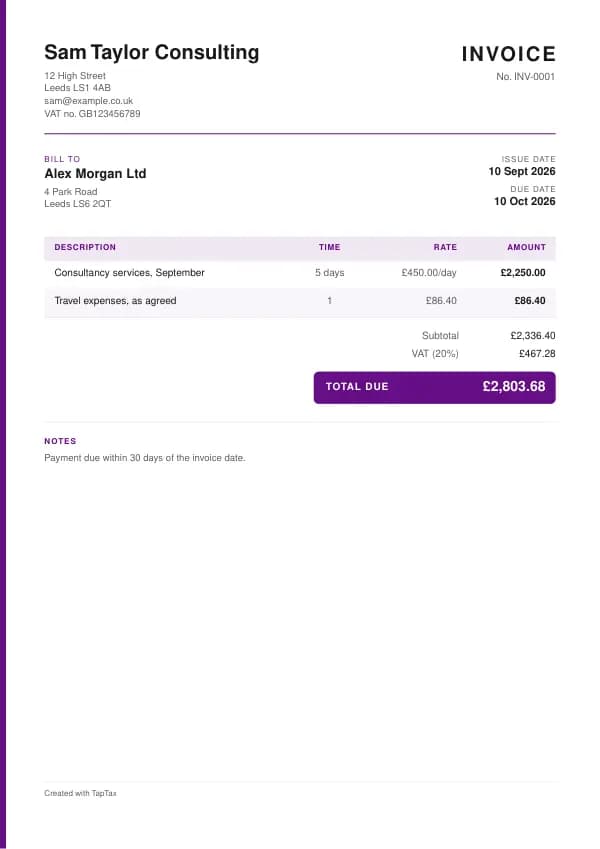
The template comes filled in with example lines like these, so you can see how each part works before replacing them with your own.
| Line | Quantity | Price | Amount |
|---|---|---|---|
| Consultancy services, September | 5 days | £450.00 | £2,250.00 |
| Travel expenses, as agreed | 1 | £86.40 | £86.40 |
| Subtotal | £2,336.40 | ||
| VAT at 20% | £467.28 | ||
| Total due | £2,803.68 |
Line by line: Consultancy services, September, 5 days × £450.00 = £2,250.00; Travel expenses, as agreed, 1 × £86.40 = £86.40. The subtotal is £2,336.40, VAT at 20% adds £467.28, and the total due is £2,803.68. The figures are illustrative; replace them with your own.
How to fill in the template
- Replace [Your business name] and the address and contact lines with your own details.
- Add your customer's name and address under "Bill to".
- Give the invoice the next number in your sequence and set the invoice date.
- Describe each piece of work or item on its own line, with the quantity and price.
- Add VAT at the correct rate only if you are VAT registered, and your VAT number.
- Set the due date from your payment terms and add your bank details.
- Save it as a PDF and email it to the person who pays, keeping a copy.
Number every invoice in sequence and never reuse a number, even when a document is cancelled. Numbers make documents easy to find and to match against payments, and they show HMRC and your customers that nothing is missing. For a numbering format, try the invoice number generator.
VAT invoices and payment terms
You can only charge VAT if you are VAT registered, and registration is compulsory once your taxable turnover over any 12 months goes above £90,000. A VAT-registered business selling to another VAT-registered business must issue a VAT invoice, normally within 30 days of the supply, showing its VAT number, the time of supply, and for each item the price excluding VAT, the rate and the VAT. Payment terms are up to you and your customer, but between businesses the law fills the gap when none are agreed: payment is due 30 days after the customer receives the invoice or the goods, and late payers owe statutory interest at 8% above the Bank of England base rate plus fixed compensation. The invoice due date calculator and late payment interest calculator do the sums.
Fixed compensation for a late business payment
- Debt up to £999.99£40
- £1,000 to £9,999.99£70
- £10,000 or more£100
Invoice, receipt, quote or pro forma?
An invoice asks to be paid for something already supplied. A receipt confirms payment has been made. A quote offers a price before the work, and a pro forma invoice asks for payment in advance but is not a real invoice or a VAT invoice. If you need to reduce or cancel an invoice after sending it, the right document is a credit note, never an edited invoice.
Getting paid on time
Most late payment is disorganisation, not refusal. Put everything needed to pay on the invoice: your bank details, the reference to use and a clear due date. Send it on the day the work is finished, to the person who actually pays, and quote the customer's purchase order number if they gave you one. Then follow a simple routine: a friendly reminder the day after the due date, a firmer one a week later, and a payment reminder letter after two weeks. If a business still does not pay, a letter before action usually does it.
Invoices for sole traders and limited companies
A sole trader invoices in their own name, or in a business name with their own name shown too, and gives an address where legal documents can be delivered. A limited company must use its full registered name, and its business letters and order forms must also show its registered number, place of registration and registered office address, which is why most companies put them on invoices too. Neither needs to be VAT registered to invoice. Until you register, you simply invoice without VAT; once registered, every invoice to a VAT-registered customer must be a full VAT invoice.
Invoicing and your tax return
For most sole traders, income is taxed on the cash basis, which is the default from the 2024 to 2025 tax year: an invoice counts as income when it is paid, not when it is sent. Your invoices are still your record of what you earned and when, so they need to be complete and kept. Under Making Tax Digital for Income Tax, your quarterly updates are built from these records, which is where keeping invoices digitally from the start pays off: nothing has to be retyped at the end of the quarter.
Common invoice mistakes
- Charging VAT when not VAT registered. You can only show VAT with a VAT number; an unregistered business shows the total with no VAT line.
- Editing an invoice after sending it. Correct mistakes with a credit note and a new invoice, so both sets of records match.
- No due date or bank details. Without them the invoice is harder to pay and easier to ignore; put both on every invoice.
Checklist before you send it
A quick check of every invoice before you send it:
- A unique invoice number is on it and correct.
- Your name or business name, and an address is on it and correct.
- Your customer's name and address is on it and correct.
- A clear description of what you are charging for is on it and correct.
- The date of supply and the date of the invoice is on it and correct.
- The amount charged for each item, VAT if applicable, and the total owed is on it and correct.
- Your VAT number, and VAT details for each rate, if VAT registered is on it and correct.
- A copy is saved with your records.
Sending it
Email the invoice as a PDF with a short, specific message: the document number, the amount, and what you need the reader to do. Address it to whoever processes it, often an accounts team, and copy your usual contact if that helps. File the sent PDF with its number in the file name, so you can find it in seconds if there is ever a question.
Keep a copy
You must keep your records for at least 5 years after the 31 January submission deadline of the relevant tax year.
Business documents are records, and records have to be kept. Save every invoice in one place, ideally digitally, so you can find it if a customer or HMRC asks. Making Tax Digital for Income Tax makes digital records compulsory from 6 April 2026 for qualifying income over £50,000, from April 2027 over £30,000 and from April 2028 over £20,000; check your date with the MTD requirement checker.
Download the invoice template
Download it as a Word document, an Excel workbook or a PDF, whichever suits the way you work. The Word file opens in Google Docs too, and the Excel file in Google Sheets. The Excel totals are live formulas. Or fill it in online with the free invoice generator, which makes a finished PDF with your details, in your colours.
Related documents in the same family: the self-billing invoice template, pro forma invoice template, commercial invoice template, export invoice template and e-invoice template. All of them follow the same numbering and record-keeping rules, and each page explains what that document must show.
If you would rather not manage documents by hand, a TapTax account, free to start, keeps your invoices, receipts and bank transactions together and files your Making Tax Digital quarterly updates to HMRC.
Tools for this
Related guides and definitions
Frequently asked questions
What must a UK invoice include?
A unique number, your name and address, the customer's name and address, a description of what you supplied, the supply and invoice dates, the amounts, VAT if applicable, and the total owed.
Can I use this invoice template if I am not VAT registered?
Yes. Delete the VAT line and do not show a VAT number; an unregistered business must not charge VAT.
Which format should I use?
Word or Google Docs if you like typing into a document; Excel or Google Sheets if you want the totals calculated; PDF to print and fill in by hand. Or use the free invoice generator online.
How do I number my invoices?
Use one unbroken sequence, such as INV-0001, INV-0002, and never reuse a number, even for a cancelled invoice.
Invoice, get paid, stay ready for HMRC.
TapTax creates and sends your invoices, tracks which ones are paid and files your quarterly updates to HMRC. Start on the free plan, no card needed.
Get started freeSources
The rules on this page come from official guidance.