
E-invoice
template
What a structured e-invoice contains, and a template of the fields ready for when the UK mandate arrives.
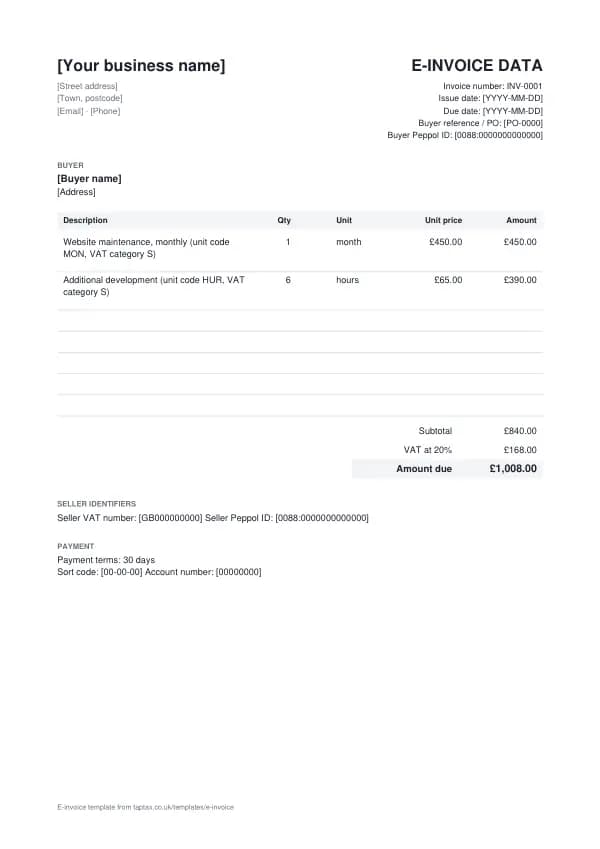
Download the e-invoice template
Free, with no sign-up. Replace the words in square brackets with your own details.
An e-invoice is data, not a picture of an invoice. A PDF emailed to a customer is an electronic invoice, but not an e-invoice in the sense the coming UK mandate uses. The government has announced that VAT invoices between businesses and to the public sector will need to be e-invoices from April 2029. This page explains what an e-invoice carries and gives you a template of the fields, so your invoices hold the right data whatever software sends them.
- E-invoice
- An invoice issued, sent and received in a structured data format that accounting systems can read automatically, such as Peppol BIS Billing 3.0, rather than as a PDF or paper document for a person to read.
When to use a e-invoice
Use this template to check that your invoices already hold every piece of information an e-invoice needs, and to prepare for moving to e-invoicing software. Many public bodies, including NHS organisations, already accept or require Peppol e-invoices from suppliers. From April 2029, VAT-registered businesses will need to issue VAT invoices to other businesses and the public sector as e-invoices. If you are not VAT registered, or you sell only to consumers, the announced mandate does not cover your invoices, although your customers' systems may still prefer e-invoices.
What a e-invoice must show
| What it shows | Why it matters |
|---|---|
| Invoice number, issue date and due date | Core identifiers every system matches on |
| Seller and buyer legal names, addresses and VAT numbers | Identifies both parties to the tax authority and systems |
| The buyer's purchase order or reference | Lets the buyer's system match it automatically |
| Each line: item, quantity, unit code, net price and VAT category and rate | Structured lines replace free text |
| VAT breakdown by rate, and totals | Machine-checked against the lines |
| Payment terms and payment account (IBAN or sort code and account) | Lets the buyer's system pay without re-keying |
| The Peppol participant IDs of seller and buyer | How the network routes the invoice |
An example e-invoice
The template comes filled in with example lines like these, so you can see how each part works before replacing them with your own.
| Line | Quantity | Price | Amount |
|---|---|---|---|
| Website maintenance, monthly (unit code MON, VAT category S) | 1 month | £450.00 | £450.00 |
| Additional development (unit code HUR, VAT category S) | 6 hours | £65.00 | £390.00 |
| Subtotal | £840.00 | ||
| VAT at 20% | £168.00 | ||
| Amount due | £1,008.00 |
Line by line: Website maintenance, monthly (unit code MON, VAT category S), 1 month × £450.00 = £450.00; Additional development (unit code HUR, VAT category S), 6 hours × £65.00 = £390.00. The subtotal is £840.00, VAT at 20% adds £168.00, and the amount due is £1,008.00. The figures are illustrative; replace them with your own.
How to fill in the template
- Check your current invoices hold every field in the list above.
- Collect your customers' purchase order references and legal details.
- Choose software or an access point that can send Peppol BIS Billing 3.0 invoices.
- Register for a Peppol participant ID through your provider.
- Test with one customer who already receives e-invoices.
- Check a sample invoice against the fields in the BIS Billing 3.0 guide before sending.
Number every e-invoice in sequence and never reuse a number, even when a document is cancelled. Numbers make documents easy to find and to match against payments, and they show HMRC and your customers that nothing is missing. For a numbering format, try the invoice number generator.
What the UK mandate covers
The government announced at Budget 2025 that all VAT invoices between UK businesses, and from businesses to the public sector, will need to be e-invoices from April 2029, using a decentralised model over the Peppol network. Sales to consumers are not covered. The detail, including the data standard and any rules for small businesses, is being set out in a roadmap, so treat 2029 as the planning date and check the UK mandate page for the latest confirmed points. Until then, e-invoicing is voluntary except where a customer requires it.
Income thresholds that change your paperwork
- Trading allowance£1,000
- MTD from April 2028£20,000
- MTD from April 2027£30,000
- MTD from April 2026£50,000
- VAT registration£90,000
E-invoice or PDF invoice?
A PDF invoice is a document for people to read; the customer still types it into their system, or uses software to guess the fields. An e-invoice is structured data that goes straight into the customer's accounts, with fewer errors and faster payment. Our guide to e-invoice vs PDF invoice explains the difference in detail.
Peppol and access points
Peppol is an international network for exchanging e-invoices, already used across Europe and by UK public bodies. You connect through an access point, a certified provider, often built into accounting software, that sends and receives invoices on your behalf. Each business on the network has a participant ID, usually based on its VAT or company number. Once you are connected, sending an e-invoice is as simple as sending a PDF, but the customer's system receives data it can process immediately. The Peppol explained guide covers how it works.
BIS Billing 3.0
Peppol BIS Billing 3.0 is the format most Peppol invoices use. It follows the European standard for e-invoices, with fixed fields for each part of the invoice, standard codes for units (such as HUR for hours) and VAT categories (such as S for standard-rated and Z for zero-rated), and validation rules that reject an invoice whose totals do not add up. Software handles the format; what you need is complete, accurate data in your invoices. The BIS Billing 3.0 guide lists the fields.
Preparing as a sole trader
For most sole traders, preparing means three things. First, make sure your invoices already carry every field an e-invoice needs, including customers' legal names, VAT numbers and purchase order references. Second, pick invoicing or accounting software that can send and receive Peppol invoices when you need it. Third, keep your data tidy: consistent customer records, product and service descriptions, and VAT rates. The preparation checklist walks through each step.
Receiving e-invoices
The mandate is about receiving as well as sending. Once suppliers send you e-invoices, you need a way to receive them: an access point, usually through your accounting software. Received e-invoices can post straight to your purchase records with the VAT already split out, which saves time on bookkeeping and makes Making Tax Digital records more accurate. It is worth setting up receiving at the same time as sending.
E-invoicing and Making Tax Digital
E-invoicing and Making Tax Digital are separate, but they fit together. MTD requires digital records and digital submission of returns; e-invoices make those records exact at the source, because the data never has to be retyped. Businesses already keeping digital records under MTD for VAT or Income Tax will find the move to e-invoicing mostly a change of sending channel. Our guide to e-invoicing and MTD explains how they connect.
Common e-invoice mistakes
- Assuming a PDF counts as an e-invoice. The mandate is about structured data, not a document attached to an email.
- Missing purchase order references. Buyers' systems match on them, and many public bodies reject invoices without one.
- Leaving preparation until 2029. Software, customer data and Peppol registration all take time to sort.
Checklist before you send it
A quick check of every e-invoice before you send it:
- Invoice number, issue date and due date is on it and correct.
- Seller and buyer legal names, addresses and VAT numbers is on it and correct.
- The buyer's purchase order or reference is on it and correct.
- Each line: item, quantity, unit code, net price and VAT category and rate is on it and correct.
- VAT breakdown by rate, and totals is on it and correct.
- Payment terms and payment account (IBAN or sort code and account) is on it and correct.
- The Peppol participant IDs of seller and buyer is on it and correct.
- A copy is saved with your records.
Sending it
Email the e-invoice as a PDF with a short, specific message: the document number, the amount, and what you need the reader to do. Address it to whoever processes it, often an accounts team, and copy your usual contact if that helps. File the sent PDF with its number in the file name, so you can find it in seconds if there is ever a question.
Keep a copy
You must keep your records for at least 5 years after the 31 January submission deadline of the relevant tax year.
Business documents are records, and records have to be kept. Save every e-invoice in one place, ideally digitally, so you can find it if a customer or HMRC asks. Making Tax Digital for Income Tax makes digital records compulsory from 6 April 2026 for qualifying income over £50,000, from April 2027 over £30,000 and from April 2028 over £20,000; check your date with the MTD requirement checker.
Download the e-invoice template
Download it as a Word document, an Excel workbook or a PDF, whichever suits the way you work. The Word file opens in Google Docs too, and the Excel file in Google Sheets. The Excel totals are live formulas.
Related documents in the same family: the invoice template, self-billing invoice template, pro forma invoice template, commercial invoice template and export invoice template. All of them follow the same numbering and record-keeping rules, and each page explains what that document must show.
If you would rather not manage documents by hand, a TapTax account, free to start, keeps your invoices, receipts and bank transactions together and files your Making Tax Digital quarterly updates to HMRC.
Tools for this
Related guides and definitions
Frequently asked questions
What is an e-invoice?
An invoice in a structured data format, such as Peppol BIS Billing 3.0, that the customer's system can process automatically. A PDF is not an e-invoice in this sense.
When does e-invoicing become mandatory in the UK?
The government has announced that VAT invoices between businesses and to the public sector must be e-invoices from April 2029.
Does e-invoicing apply if I am not VAT registered?
The announced mandate covers VAT invoices, so businesses that are not VAT registered are not covered, although customers may still ask for e-invoices.
Invoice, get paid, stay ready for HMRC.
TapTax creates and sends your invoices, tracks which ones are paid and files your quarterly updates to HMRC. Start on the free plan, no card needed.
Get started freeSources
The rules on this page come from official guidance.