
Credit note
template
A credit note to reduce or cancel an invoice, with the VAT details HMRC says it must show.
Download the credit note template
Free, with no sign-up. Replace the words in square brackets with your own details.
The free credit note generator makes a finished PDF with your details, logo and colours. Nothing is stored.
Once an invoice has been issued you should not edit or delete it. If it was wrong or the customer returns something, you issue a credit note against it instead. The credit note reduces what the customer owes, or gives them a refund or credit for future work, and keeps your records complete. For VAT-registered businesses, HMRC sets out what a valid credit note must show; this template includes all of it.
- Credit note
- A document a supplier issues to reduce or cancel the amount a customer owes on an invoice, for example after a return, an overcharge, or an agreed discount. It references the original invoice and shows the amount credited.
When to use a credit note
Issue a credit note when goods are returned, when you overcharged or made a mistake on an invoice, when you agree a discount or price reduction after invoicing, or when an invoice needs cancelling entirely. If an invoice has not been sent yet, you can simply correct it; once it has gone to the customer, the credit note is the right route. For VAT, the credit note must reflect a genuine mistake, overcharge or agreed reduction, and where you refund the customer, it must be issued within 14 days of the refund.
What a credit note must show
| What it shows | Why it matters |
|---|---|
| The heading "Credit note" and a unique credit note number | Separate from invoices, in its own sequence |
| The date of issue | When the credit takes effect |
| Your name, address and VAT number if registered | Who is giving the credit |
| The customer's name and address | Who receives it |
| The number and date of the original invoice | Links the credit to the sale |
| A description, quantity and amount of each item credited, and the reason | What is being credited and why |
| The total credited excluding VAT, and the VAT rate and amount credited | Adjusts both sides' VAT |
An example credit note
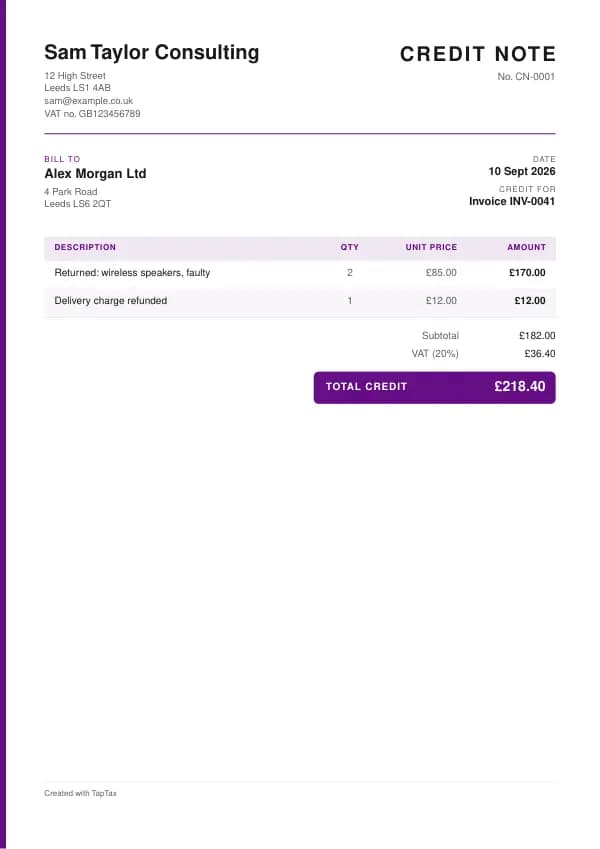
The template comes filled in with example lines like these, so you can see how each part works before replacing them with your own.
| Line | Quantity | Price | Amount |
|---|---|---|---|
| Returned: wireless speakers, faulty | 2 | £85.00 | £170.00 |
| Delivery charge refunded | 1 | £12.00 | £12.00 |
| Subtotal | £182.00 | ||
| VAT at 20% | £36.40 | ||
| Total credited | £218.40 |
Line by line: Returned: wireless speakers, faulty, 2 × £85.00 = £170.00; Delivery charge refunded, 1 × £12.00 = £12.00. The subtotal is £182.00, VAT at 20% adds £36.40, and the total credited is £218.40. The figures are illustrative; replace them with your own.
How to fill in the template
- Give the credit note its own number, such as CN-0001.
- Add your details, the customer's, and the original invoice number and date.
- List what is credited, with quantities and amounts, and the reason.
- Add VAT at the same rate as the original invoice.
- Say whether the credit will be refunded or set against future invoices.
- Send it, and record it against the original invoice in your books.
Give each credit note its own number in a single sequence, and never reuse one. A number lets you and your customer refer to the document without confusion, and an unbroken sequence shows your records are complete. The invoice number generator suggests a format that stays tidy for years.
Valid credit notes for VAT
For VAT, HMRC says a credit note must reflect a genuine mistake, overcharge or agreed reduction, and give real value to the customer, either as a refund or as a credit against future supplies. It must show its number and date, your name, address and VAT number, the customer's name and address, a description of what is credited with the quantity and amount for each, the total credited excluding VAT, the VAT rate and amount, and the number and date of the original invoice. Where a refund is paid, issue the credit note within 14 days of the refund. Both you and the customer adjust your VAT records for the period in which the credit note is issued.
UK VAT rates
- Standard rate20%
- Reduced rate5%
- Zero rate0%
Credit note or debit note?
A credit note reduces what the customer owes. A debit note increases it, for example after an undercharge, or is used by a buyer to ask the supplier for a credit. Both reference the original invoice.
Cancelling an invoice
To cancel an invoice completely, issue a credit note for the full amount, including VAT, referencing the invoice. Do not delete the invoice or reuse its number: the invoice and credit note together show what happened, and your numbering stays unbroken. If a corrected invoice is needed, issue it with a new number after the credit note. Our guide on how to cancel an invoice walks through the steps.
Partial credits and discounts
A credit note can cover part of an invoice: one returned item, a price reduction for a late delivery, or a goodwill discount. Show exactly what is credited, and apply VAT at the same rate as the original line. If you offer a prompt payment discount, the VAT is based on what the customer actually pays, so a credit note may be needed if they take the discount after the invoice was issued, unless the invoice already set out the discount terms.
Refunds or credit on account
A credit note can be refunded, or held as credit against future invoices. Say which on the credit note. If it is held on account, show it on the customer's next statement and deduct it from the next invoice. If you refund it, record the payment against the credit note. Customers who are consumers usually expect a refund to the original payment method, and the Consumer Rights Act gives them rights to one in many cases.
Credit notes in your accounts
A credit note reduces your sales for the period it is issued in. On the cash basis, a refund reduces your income when it is paid; on the traditional basis, the credit note reduces sales when issued. For VAT, a credit note issued in a later period reduces your output VAT in that later period, not in the original one. Keep credit notes in a separate numbered sequence, and match each one to the invoice it relates to.
Bad debts are different
Do not issue a credit note just because a customer has not paid. An unpaid invoice is still owed. If it becomes clear it will not be paid, write it off as a bad debt in your accounts; if you are VAT registered, you may be able to claim bad debt relief on the VAT once the debt is over six months overdue and written off. A credit note tells the customer they no longer owe you, which you do not want to do by accident.
Common credit note mistakes
- Deleting or editing an invoice that has been sent. Issue a credit note instead so your records stay complete.
- Not quoting the original invoice number. HMRC requires it on VAT credit notes, and it lets both sides match the credit.
- Using a credit note to write off an unpaid debt. That tells the customer they do not owe you; use bad debt relief instead.
Checklist before you send it
Before a credit note goes out, check it against the list of what it must show:
- The heading "Credit note" and a unique credit note number is on it and correct.
- The date of issue is on it and correct.
- Your name, address and VAT number if registered is on it and correct.
- The customer's name and address is on it and correct.
- The number and date of the original invoice is on it and correct.
- A description, quantity and amount of each item credited, and the reason is on it and correct.
- The total credited excluding VAT, and the VAT rate and amount credited is on it and correct.
- A copy is saved with your records.
Sending it
Send the credit note as a PDF attached to an email, not as an editable file. In the email, say what it is, its number, the amount and any date that matters, so the reader can act without opening the attachment. Send it to the person or inbox that deals with it, which for a business is often an accounts address rather than the person you worked with, and keep a copy of the email and the PDF together in your records.
Keep a copy
You must keep your records for at least 5 years after the 31 January submission deadline of the relevant tax year.
Keep a copy of every credit note you issue or receive, digital is fine, with the payments that relate to it. From 6 April 2026, sole traders and landlords with qualifying income over £50,000 must keep digital records and send HMRC quarterly updates under Making Tax Digital, falling to £30,000 from April 2027 and £20,000 from April 2028. The MTD requirement checker shows when it applies to you, and how long to keep invoices covers retention.
Download the credit note template
The template comes as a Word document for Word, Google Docs and Pages, an Excel workbook for Excel and Google Sheets, and a print-ready PDF. Replace the words in square brackets with your own details. In the Excel version each line, the subtotal and the total are formulas, so the figures update as you type. Or fill it in online with the free credit note generator, which makes a finished PDF with your details, in your colours.
Related documents in the same family: the invoice template, self-billing invoice template, pro forma invoice template, commercial invoice template and export invoice template. All of them follow the same numbering and record-keeping rules, and each page explains what that document must show.
A TapTax account, free to start, creates and sends invoices, tracks which are paid, keeps receipts and bills with your records, and files your quarterly updates to HMRC from the same data.
Tools for this
Related guides and definitions
Frequently asked questions
When should I issue a credit note?
When goods are returned, when an invoice was wrong or overcharged, when you agree a reduction after invoicing, or to cancel an invoice.
What must a credit note show for VAT?
Its number and date, both parties' details, your VAT number, what is credited with quantities and amounts, the total excluding VAT, the VAT rate and amount, and the original invoice number and date.
Can I just delete a wrong invoice?
Not once it has been sent. Issue a credit note for it, and a new invoice if needed.
Invoice, get paid, stay ready for HMRC.
TapTax creates and sends your invoices, tracks which ones are paid and files your quarterly updates to HMRC. Start on the free plan, no card needed.
Get started freeSources
The rules on this page come from official guidance.