
Debit note
template
A debit note to increase an invoice after an undercharge, or to ask a supplier for a credit.
Download the debit note template
Free, with no sign-up. Replace the words in square brackets with your own details.
A debit note has two common uses. A supplier who undercharged, or who agreed an increase after invoicing, issues a debit note to add the extra, as a supplementary charge against the original invoice. A buyer who has returned goods or been overcharged can issue a debit note to the supplier, recording the amount they are deducting and asking for a credit note. This template works for both, and includes the VAT details HMRC lists for a valid debit note.
- Debit note
- A document that adjusts an invoice upwards, or asks for an adjustment. Suppliers use it to charge more after an undercharge or an agreed price increase; buyers use it to notify a supplier of a return or overcharge and request a credit note.
When to use a debit note
Use a debit note as a supplier when you undercharged on an invoice, for example missing a line or using the wrong price, or when the customer agreed an increase after the invoice was issued. Use one as a buyer when you return goods or find an overcharge and want to record the amount you expect to be credited. If you are a supplier and the change is a reduction, use a credit note instead. For a large or complex correction, it can be simpler to cancel the invoice with a credit note and issue a new one.
What a debit note must show
| What it shows | Why it matters |
|---|---|
| The heading "Debit note" and a unique debit note number | Separate from invoices and credit notes |
| The date of issue | When the adjustment is made |
| The supplier's name, address and VAT number | Who made the supply |
| The customer's name and address | Who was supplied |
| The number and date of the original invoice | Links the adjustment to the sale |
| A description of the adjustment, with quantity and amount, and the reason | What is being added or disputed |
| The amount excluding VAT, and the VAT rate and amount | Adjusts VAT on both sides |
An example debit note
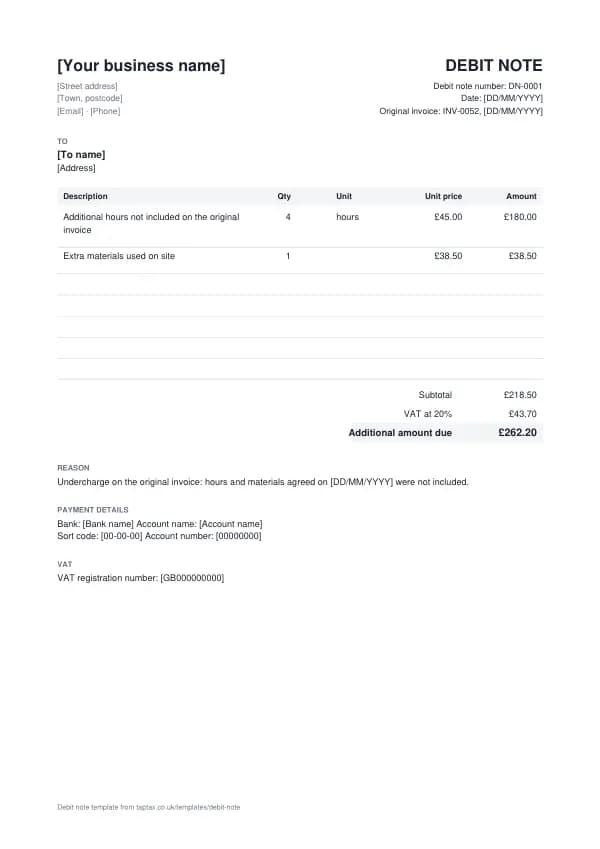
The template comes filled in with example lines like these, so you can see how each part works before replacing them with your own.
| Line | Quantity | Price | Amount |
|---|---|---|---|
| Additional hours not included on the original invoice | 4 hours | £45.00 | £180.00 |
| Extra materials used on site | 1 | £38.50 | £38.50 |
| Subtotal | £218.50 | ||
| VAT at 20% | £43.70 | ||
| Additional amount due | £262.20 |
Line by line: Additional hours not included on the original invoice, 4 hours × £45.00 = £180.00; Extra materials used on site, 1 × £38.50 = £38.50. The subtotal is £218.50, VAT at 20% adds £43.70, and the additional amount due is £262.20. The figures are illustrative; replace them with your own.
How to fill in the template
- Give the debit note its own number, such as DN-0001.
- Add both parties' details and the original invoice number and date.
- Describe the adjustment with quantities and amounts, and the reason.
- Add VAT at the rate on the original invoice.
- As a supplier, add a due date and payment details; as a buyer, ask for a credit note.
- Send it within 14 days of agreeing the change, and record it against the invoice.
Number every debit note in sequence and never reuse a number, even when a document is cancelled. Numbers make documents easy to find and to match against payments, and they show HMRC and your customers that nothing is missing. For a numbering format, try the invoice number generator.
Valid debit notes for VAT
HMRC says a debit note must reflect a genuine mistake, undercharge or agreed increase in the value of the supply, and be issued within 14 days of the increase being agreed between the supplier and the customer. It must show its identifying number and date, the supplier's name, address and VAT number, the customer's name and address, the number and date of the original VAT invoice, a description of what is being adjusted with the quantity and amount, the total excluding VAT, and the VAT rate and amount. Both sides adjust their VAT records in the period the debit note is issued.
UK VAT rates
- Standard rate20%
- Reduced rate5%
- Zero rate0%
Debit note or new invoice?
A debit note adjusts an existing invoice and points back to it, so both parties can see the full history. A new invoice stands alone. For a small undercharge on one invoice, a debit note is clearer; for a separate piece of work, invoice it normally.
Debit notes from buyers
Buyers, particularly larger businesses, often issue debit notes to suppliers when they return goods, find a short delivery, or dispute a price. The buyer's debit note records the amount they intend to deduct and asks the supplier to confirm with a credit note. For VAT, the buyer cannot simply reduce their input tax on the strength of their own debit note unless both sides agree the arrangement; the adjustment is normally evidenced by the supplier's credit note, so keep them paired.
Agreeing the change first
A debit note that increases what a customer owes should follow an agreement, or a clear contractual right, to charge more. Sending one out of the blue for extra work the customer did not agree to is a common source of disputes. Record the agreement, even by email, and quote it on the debit note. If the customer disputes it, the invoice disputes guide explains how to resolve it.
Numbering and records
Keep debit notes in their own numbered sequence, alongside your invoices and credit notes, and link each to the invoice it adjusts. In your accounts, a supplier's debit note adds to sales in the period it is issued; a buyer's debit note is usually a memo until the supplier credits it. Keep them with your other records for at least five years after the 31 January submission deadline of the relevant tax year.
Payment terms on a debit note
Give the additional amount the same payment terms as the original invoice unless you agree otherwise, and include your bank details. If the original invoice is already overdue, do not use the debit note to add interest: statutory interest and late payment compensation are claimed separately, with their own calculation. The late payment interest calculator works them out.
Debit notes and credit notes together
Sometimes an invoice needs both, such as one line undercharged and another overcharged. You can issue one debit note and one credit note, or a single credit note and a new invoice. Pick the approach your customer can follow most easily, and make sure the VAT on each document matches the rate on the original line. The aim is a clear paper trail from the first invoice to the final amount paid.
Common debit note mistakes
- Using a debit note for work the customer never agreed. Agree the change first, and quote the agreement.
- Leaving out the original invoice number. It is required for VAT and lets both sides match the adjustment.
- Adding late payment interest on a debit note. Claim statutory interest and compensation separately.
Checklist before you send it
A quick check of every debit note before you send it:
- The heading "Debit note" and a unique debit note number is on it and correct.
- The date of issue is on it and correct.
- The supplier's name, address and VAT number is on it and correct.
- The customer's name and address is on it and correct.
- The number and date of the original invoice is on it and correct.
- A description of the adjustment, with quantity and amount, and the reason is on it and correct.
- The amount excluding VAT, and the VAT rate and amount is on it and correct.
- A copy is saved with your records.
Sending it
Email the debit note as a PDF with a short, specific message: the document number, the amount, and what you need the reader to do. Address it to whoever processes it, often an accounts team, and copy your usual contact if that helps. File the sent PDF with its number in the file name, so you can find it in seconds if there is ever a question.
Keep a copy
You must keep your records for at least 5 years after the 31 January submission deadline of the relevant tax year.
Business documents are records, and records have to be kept. Save every debit note in one place, ideally digitally, so you can find it if a customer or HMRC asks. Making Tax Digital for Income Tax makes digital records compulsory from 6 April 2026 for qualifying income over £50,000, from April 2027 over £30,000 and from April 2028 over £20,000; check your date with the MTD requirement checker.
Download the debit note template
Download it as a Word document, an Excel workbook or a PDF, whichever suits the way you work. The Word file opens in Google Docs too, and the Excel file in Google Sheets. The Excel totals are live formulas.
Related documents in the same family: the invoice template, self-billing invoice template, pro forma invoice template, commercial invoice template and export invoice template. All of them follow the same numbering and record-keeping rules, and each page explains what that document must show.
If you would rather not manage documents by hand, a TapTax account, free to start, keeps your invoices, receipts and bank transactions together and files your Making Tax Digital quarterly updates to HMRC.
Tools for this
Related guides and definitions
Frequently asked questions
What is a debit note?
A document that increases the amount owed on an invoice, or that a buyer uses to record a return or overcharge and ask for a credit.
When must a VAT debit note be issued?
Within 14 days of the increase being agreed between the supplier and the customer.
What is the difference between a debit note and a credit note?
A debit note increases what is owed; a credit note reduces it.
Invoice, get paid, stay ready for HMRC.
TapTax creates and sends your invoices, tracks which ones are paid and files your quarterly updates to HMRC. Start on the free plan, no card needed.
Get started freeSources
The rules on this page come from official guidance.