
Work order
template
A work order that authorises a job: what to do, where, by when, and the spending limit.
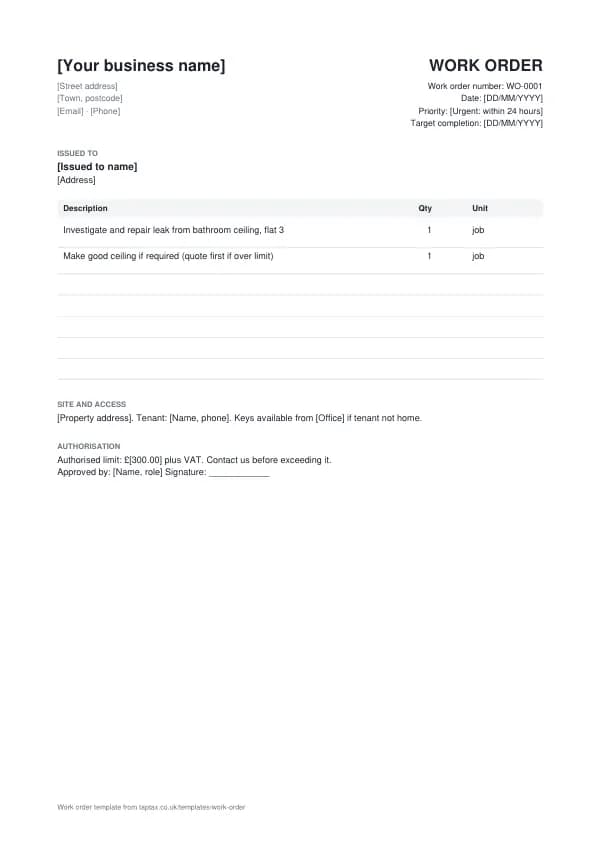
Download the work order template
Free, with no sign-up. Replace the words in square brackets with your own details.
A work order is the "go ahead" for a job. Landlords, letting agents and facilities teams issue them to trades; contractors issue them to their subcontractors and staff. It defines what is authorised, so the person doing the work knows the scope and limit, and the person paying knows what they agreed. This template covers the request, priority, access, budget and approval.
- Work order
- A written instruction to carry out a job, issued by a customer to a contractor, or by a business to its own staff or subcontractors. It sets out the work, the location, the timing, any access arrangements and the authorised cost.
When to use a work order
Use a work order when a job is requested by someone other than the person who will do it, or when a paying customer needs to authorise spending before work starts: a letting agent instructing a plumber, a facilities manager booking a repair, a main contractor instructing a subcontractor, or a business owner assigning a job to staff. The work order goes out first; the job sheet records what was done; the invoice charges for it, quoting the work order number.
What a work order must show
| What it shows | Why it matters |
|---|---|
| A work order number and date | Identifies the instruction |
| Who issued it and who is to do the work | The parties |
| The site address, access arrangements and contact | Where and how to get in |
| A description of the work required | The authorised scope |
| Priority and target completion date | When it must be done |
| The authorised budget or spending limit | What can be spent without further approval |
| Approval signature and name | Confirms the job is authorised |
An example work order
The template comes filled in with example lines like these, so you can see how each part works before replacing them with your own.
| Item | Quantity |
|---|---|
| Investigate and repair leak from bathroom ceiling, flat 3 | 1 job |
| Make good ceiling if required (quote first if over limit) | 1 job |
How to fill in the template
- Describe the job clearly, including the fault or result required.
- Add the site address, access arrangements and a contact on site.
- Set the priority and target date.
- Set a spending limit and who to call before exceeding it.
- Sign it to authorise the work, and send it to the contractor or staff member.
- Match the invoice to the work order number before paying.
Give each work order its own number in a single sequence, and never reuse one. A number lets you and your customer refer to the document without confusion, and an unbroken sequence shows your records are complete. The invoice number generator suggests a format that stays tidy for years.
Spending limits and variations
The spending limit is the most useful line on a work order. It lets the contractor get on with the job up to that amount without waiting for approval, while protecting the payer from surprise bills. If the job turns out bigger, the contractor should stop at the limit, explain what is needed, and get a written variation or a new work order before continuing. For the contractor, that written approval is what makes the extra cost payable. Record who approved it and when.
Income thresholds that change your paperwork
- Trading allowance£1,000
- MTD from April 2028£20,000
- MTD from April 2027£30,000
- MTD from April 2026£50,000
- VAT registration£90,000
Work order or purchase order?
A purchase order commits to buying goods or services at a price. A work order instructs a job to be carried out, often with a limit rather than a fixed price. Many organisations raise both: a purchase order for the finance system and a work order for the person doing the job.
Work orders from letting agents
Letting agents issue work orders on behalf of landlords for repairs. They usually include the tenant's contact details, access instructions, a spending limit, and the agent's reference, which must appear on the invoice. Agents often pay only when the invoice, work order number and a job sheet or photos all match. Invoice promptly and include everything they ask for, and you will be paid faster.
Work orders to subcontractors
When you instruct a subcontractor, a work order sets out the scope, price or limit, programme, and site rules. For construction work, check whether CIS applies, verify the subcontractor with HMRC, and make sure their invoices split labour and materials. The work order is also where you record health and safety requirements and any documents the subcontractor must provide before starting.
Internal work orders
Businesses with staff use work orders to assign jobs and track them: who is doing what, where, and by when. They make it easy to see which jobs are open, bill customers accurately, and check how long work takes against quotes. A simple spreadsheet or job management app is enough for most small businesses.
Priorities and response times
State the priority clearly and in the same terms each time, such as emergency (make safe within 4 hours), urgent (within 24 hours), routine (within 7 days) and planned (by a set date). Agree what each category means with your contractors in advance. For landlords, some repairs have legal timescales or health and safety implications, so emergency and urgent categories should match those.
Worked example
A letting agent receives a report of water coming through a bathroom ceiling. They issue work order WO-0877 to a plumber, marked urgent, with the tenant's number, key collection details and a £300 limit plus VAT. The plumber finds a failed waste joint, repairs it for £180, photographs the ceiling, and calls the agent: making good the ceiling will be £260. The agent approves a second work order for the ceiling. The plumber invoices both, quoting each number with photos and job sheets, and both are paid in the next payment run.
Closing work orders
A work order should be closed when the job is complete and invoiced. Record the completion date, the job sheet reference and the invoice number. Reviewing closed work orders shows how quickly jobs were done, how often limits were exceeded, and which contractors are most reliable, which is useful information for landlords, agents and anyone managing several trades. Keep closed work orders with the invoices and job sheets that go with them, so the full story of each repair is in one place if a tenant, insurer or HMRC asks about it later.
Work orders for landlords managing their own lets
Landlords who manage their own properties can use work orders to keep repairs organised: one per repair, with the property, tenant contact, the problem, and a spending limit. When the invoice arrives, match it to the work order, and file both with the property's records. Repairs are usually allowable expenses against rental income, while improvements are not, so a clear description of the work on each work order helps sort them at the tax year end.
Common work order mistakes
- No spending limit. Contractors then either stop for approval or run up costs you did not expect.
- Missing access details. Wasted visits cost everyone time and money.
- Invoices without the work order number. They are often rejected until matched.
Checklist before you send it
Before a work order goes out, check it against the list of what it must show:
- A work order number and date is on it and correct.
- Who issued it and who is to do the work is on it and correct.
- The site address, access arrangements and contact is on it and correct.
- A description of the work required is on it and correct.
- Priority and target completion date is on it and correct.
- The authorised budget or spending limit is on it and correct.
- Approval signature and name is on it and correct.
- A copy is saved with your records.
Sending it
Send the work order as a PDF attached to an email, not as an editable file. In the email, say what it is, its number, the amount and any date that matters, so the reader can act without opening the attachment. Send it to the person or inbox that deals with it, which for a business is often an accounts address rather than the person you worked with, and keep a copy of the email and the PDF together in your records.
Keep a copy
You must keep your records for at least 5 years after the 31 January submission deadline of the relevant tax year.
Keep a copy of every work order you issue or receive, digital is fine, with the payments that relate to it. From 6 April 2026, sole traders and landlords with qualifying income over £50,000 must keep digital records and send HMRC quarterly updates under Making Tax Digital, falling to £30,000 from April 2027 and £20,000 from April 2028. The MTD requirement checker shows when it applies to you, and how long to keep invoices covers retention.
Download the work order template
The template comes as a Word document for Word, Google Docs and Pages, an Excel workbook for Excel and Google Sheets, and a print-ready PDF. Replace the words in square brackets with your own details.
Related documents in the same family: the delivery note template, job sheet template and timesheet template. All of them follow the same numbering and record-keeping rules, and each page explains what that document must show.
A TapTax account, free to start, creates and sends invoices, tracks which are paid, keeps receipts and bills with your records, and files your quarterly updates to HMRC from the same data.
Tools for this
Related guides and definitions
Frequently asked questions
What is a work order?
A written instruction to carry out a job, setting out the work, location, timing and authorised cost.
Who issues a work order?
The customer or manager commissioning the work, such as a landlord, letting agent, facilities team or contractor.
What happens if the job costs more than the limit?
The contractor should stop and get written approval for the extra before continuing.
Invoice, get paid, stay ready for HMRC.
TapTax creates and sends your invoices, tracks which ones are paid and files your quarterly updates to HMRC. Start on the free plan, no card needed.
Get started freeSources
The rules on this page come from official guidance.