
Purchase order
template
Order goods and services in writing, with a PO number your supplier quotes on their invoice.
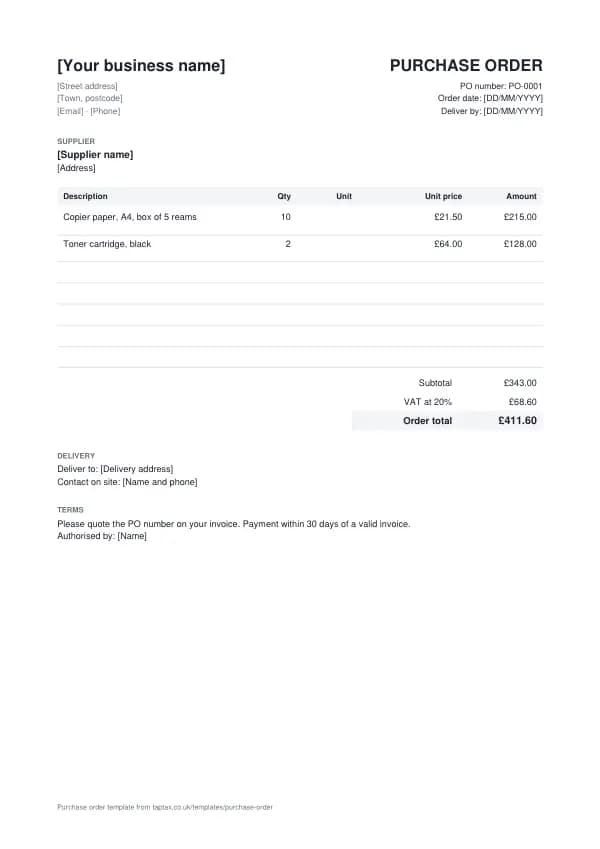
Download the purchase order template
Free, with no sign-up. Replace the words in square brackets with your own details.
A purchase order puts an order in writing before any money changes hands: what you are buying, how many, at what price, and when it must arrive. Small businesses use them to control spending and to make supplier invoices easy to check; larger customers often insist on them before they will pay. This template gives you a clear, numbered purchase order ready to send.
- Purchase order
- A document a buyer sends a supplier to order goods or services at an agreed price. Once the supplier accepts it, it forms the contract, and its number is quoted on the supplier's invoice so the two can be matched.
When to use a purchase order
Raise a purchase order whenever you commit to spending money with a supplier, especially for larger orders, regular stock, or services where the price and delivery date matter. A purchase order gives you a record of what you agreed before the invoice arrives, so you can check the invoice against it, and it shows what you have committed to spend before the bills land. It is equally useful the other way round: if a customer sends you a purchase order, quote its number on your invoice, because many accounts teams will not pay an invoice without one. Businesses that use purchase orders consistently find they pay fewer wrong invoices, argue less with suppliers about what was ordered, and have a clearer picture of their costs month by month.
What a purchase order must show
| What it shows | Why it matters |
|---|---|
| A unique purchase order number | The supplier quotes it on their invoice so you can match them |
| Your business name, address and contact | Who is ordering and where to send questions |
| The supplier's name and address | Who the order is placed with |
| A description of each item or service, quantity and agreed price | Exactly what is being bought and for how much |
| Delivery address and required date | Where and when it must arrive |
| Payment terms and any other conditions | When the supplier will be paid |
| Authorised by, and the order date | Who approved the spending, and when |
An example purchase order
The template comes filled in with example lines like these, so you can see how each part works before replacing them with your own.
| Line | Quantity | Price | Amount |
|---|---|---|---|
| Copier paper, A4, box of 5 reams | 10 | £21.50 | £215.00 |
| Toner cartridge, black | 2 | £64.00 | £128.00 |
| Subtotal | £343.00 | ||
| VAT at 20% | £68.60 | ||
| Order total | £411.60 |
Line by line: Copier paper, A4, box of 5 reams, 10 × £21.50 = £215.00; Toner cartridge, black, 2 × £64.00 = £128.00. The subtotal is £343.00, VAT at 20% adds £68.60, and the order total is £411.60. The figures are illustrative; replace them with your own.
How to fill in the template
- Add your business details and the supplier's name and address.
- Give the order the next PO number and today's date.
- List each item or service with the quantity and the price you agreed.
- Add the delivery address, the date you need it by and a contact on site.
- State your payment terms and ask the supplier to quote the PO number on their invoice.
- Have it approved by whoever authorises spending, then send it as a PDF.
Give each purchase order its own number in a single sequence, and never reuse one. A number lets you and your customer refer to the document without confusion, and an unbroken sequence shows your records are complete. The invoice number generator suggests a format that stays tidy for years.
Purchase orders, contracts and VAT
Once a supplier accepts a purchase order, by confirming it or by delivering, it is usually a binding contract on the terms it sets out, so be precise about quantities, prices and dates, and attach or reference any specification the goods must meet. If the supplier accepts on its own terms and conditions instead, the terms that apply can be disputed; the simplest protection is a short line on the purchase order saying your terms apply, or agreeing the terms in writing up front. A purchase order is not a tax document and carries no VAT of its own: the supplier's invoice is what records the supply and any VAT, and it is the invoice, not the purchase order, that a VAT-registered buyer needs to reclaim VAT. Showing expected VAT on the purchase order simply helps you check the invoice when it arrives.
Income thresholds that change your paperwork
- Trading allowance£1,000
- MTD from April 2028£20,000
- MTD from April 2027£30,000
- MTD from April 2026£50,000
- VAT registration£90,000
Purchase order or invoice?
A purchase order comes from the buyer before the supply; an invoice comes from the supplier after it. Matching the two, and the delivery note that records what actually arrived, is how businesses make sure they only pay for what they ordered and received. Suppliers who receive a purchase order should quote its number on their invoice.
Three-way matching for small businesses
Before paying a supplier invoice, check three things agree: the purchase order (what you ordered and the price), the delivery note (what arrived) and the invoice (what you are being charged). Any difference, such as a short delivery or a price increase, is queried before payment. It sounds like big-company process, but it takes seconds with a numbered purchase order, and it stops overpayments and duplicate invoices getting through.
When a customer sends you a purchase order
If you are the supplier, a purchase order is good news: it confirms the order and tells you exactly what the customer's accounts team will pay against. Check it matches your quote before you accept it, and query any difference straight away. Then quote the PO number on your invoice, deliver exactly what it lists, and invoice for exactly that. Many large customers pay only when the invoice, the purchase order and the goods received record agree, so a mismatched invoice can wait weeks.
Blanket and standing orders
For regular supplies, such as monthly stationery or a cleaning contract, a single blanket purchase order can cover a period and a maximum value, with deliveries called off against it. Each invoice then quotes the same PO number and the running total is tracked against the limit. It saves raising a new order each time while keeping spending under control, and it gives your supplier certainty about the relationship.
Purchase orders and cash flow
Every purchase order is money you have promised to pay, so an open-orders list is an early view of your outgoings. Add up the purchase orders not yet invoiced, and the invoices not yet paid, and you know what is coming out of the bank in the weeks ahead. For a sole trader or small business, that simple list is often the difference between being surprised by a big supplier bill and being ready for it. When an order is cancelled or reduced, update or cancel the purchase order in writing too, so your list and the supplier's stay in step.
Common purchase order mistakes
- Ordering without a number. Without a PO number, supplier invoices are hard to match and easy to pay twice.
- Vague descriptions or prices. A purchase order is a contract once accepted; be exact about what you are buying and the price.
- Paying an invoice that does not match the order. Check quantity and price against the purchase order before paying.
Checklist before you send it
Before a purchase order goes out, check it against the list of what it must show:
- A unique purchase order number is on it and correct.
- Your business name, address and contact is on it and correct.
- The supplier's name and address is on it and correct.
- A description of each item or service, quantity and agreed price is on it and correct.
- Delivery address and required date is on it and correct.
- Payment terms and any other conditions is on it and correct.
- Authorised by, and the order date is on it and correct.
- A copy is saved with your records.
Sending it
Send the purchase order as a PDF attached to an email, not as an editable file. In the email, say what it is, its number, the amount and any date that matters, so the reader can act without opening the attachment. Send it to the person or inbox that deals with it, which for a business is often an accounts address rather than the person you worked with, and keep a copy of the email and the PDF together in your records.
Keep a copy
You must keep your records for at least 5 years after the 31 January submission deadline of the relevant tax year.
Keep a copy of every purchase order you issue or receive, digital is fine, with the payments that relate to it. From 6 April 2026, sole traders and landlords with qualifying income over £50,000 must keep digital records and send HMRC quarterly updates under Making Tax Digital, falling to £30,000 from April 2027 and £20,000 from April 2028. The MTD requirement checker shows when it applies to you, and how long to keep invoices covers retention.
Download the purchase order template
The template comes as a Word document for Word, Google Docs and Pages, an Excel workbook for Excel and Google Sheets, and a print-ready PDF. Replace the words in square brackets with your own details. In the Excel version each line, the subtotal and the total are formulas, so the figures update as you type.
Related documents in the same family: the quote template and estimate template. All of them follow the same numbering and record-keeping rules, and each page explains what that document must show.
A TapTax account, free to start, creates and sends invoices, tracks which are paid, keeps receipts and bills with your records, and files your quarterly updates to HMRC from the same data.
Tools for this
Related guides and definitions
Frequently asked questions
Is a purchase order legally binding?
Usually, once the supplier accepts it by confirming the order or delivering the goods, it forms the contract on its terms.
Does a purchase order include VAT?
It can show expected VAT to help you check the invoice, but the supplier's invoice is the VAT document.
What is a PO number for?
The supplier quotes it on their invoice so you can match the invoice to the order before paying.
Invoice, get paid, stay ready for HMRC.
TapTax creates and sends your invoices, tracks which ones are paid and files your quarterly updates to HMRC. Start on the free plan, no card needed.
Get started freeSources
The rules on this page come from official guidance.