
Receipt
template for Excel
A receipt in Excel that does the sums for you: live formulas for each line, the subtotal and the total.
Download the receipt template
Free, with no sign-up. Replace the words in square brackets with your own details.
The free receipt generator makes a finished PDF with your details, logo and colours. Nothing is stored.
The Excel version of the receipt template works as a calculator as well as a form. Type a quantity and a price and the line total, subtotal and total update on their own. This page explains how the formulas work, how to keep them safe, how to organise a year's worth of documents, and what a UK receipt must show.
How the formulas work
Each line's amount is its quantity multiplied by its unit price, rounded to the penny: =ROUND(B12*D12,2). The subtotal adds up the amount column with SUM, the total adds them together. Type only into the description, quantity, unit and price cells; the amount and total cells should be left alone. The empty rows below the example lines already contain the formula, and the money format shows nothing until you enter a quantity and price, so the sheet stays tidy.
Adding rows without breaking the totals
If you need more lines than the template provides, insert new rows in the middle of the lines (right-click a row number, Insert) rather than below the last one. Excel then extends the SUM range automatically. Copy the amount formula into the new row by dragging down from the row above. A quick way to check nothing is broken is to click the total cell and look at the formula bar: it should refer to the subtotal cells, not to a typed number.
Protecting the formulas
To stop a formula being typed over, lock the calculated cells. Select the cells you type into, choose Format Cells, Protection, and untick Locked; then choose Review, Protect Sheet. From then on only the input cells can be edited. Keep one workbook per year, and make a new sheet for each receipt by right-clicking the sheet tab and choosing Move or Copy, Create a copy, naming each tab with its number.
Sending it
Send a PDF, not the spreadsheet. In Excel, choose File, Export, Create PDF/XPS (or Save As, PDF on a Mac), and select only the receipt sheet. Check the print preview first: the template is set to fit one page wide, so it prints and exports cleanly on A4. Keep the workbook as your working record and the PDF as the copy you sent.
Changing the VAT rate
The VAT rate sits in its own cell next to the VAT line, formatted as a percentage, and the VAT and total formulas refer to it. If you are not VAT registered, delete the VAT row entirely (right-click the row number, Delete) and check the total now equals the subtotal: an unregistered business must not show VAT. If you charge 5% on some work, change the rate cell to 5%, or keep two receipts rather than mixing rates on one sheet, which is simpler to get right.
What the receipt must show
Give a receipt whenever a customer pays you and wants proof: cash sales, card payments at an event, bank transfers for a job, payments for lessons or treatments. Business customers need a receipt to claim the cost as an expense.
| What it shows | Why it matters |
|---|---|
| The word "Receipt", a number and the date | Identifies the receipt |
| Your business name and address | Who received the money |
| The customer's name, if known | Who paid |
| What was paid for | The goods or services |
| The amount paid and how (cash, card, transfer) | Proof of payment |
| The invoice number it settles, if any | Links payment to the invoice |
| VAT number, rate and VAT-inclusive total, if you are registered | Makes it a simplified VAT invoice up to £250 |
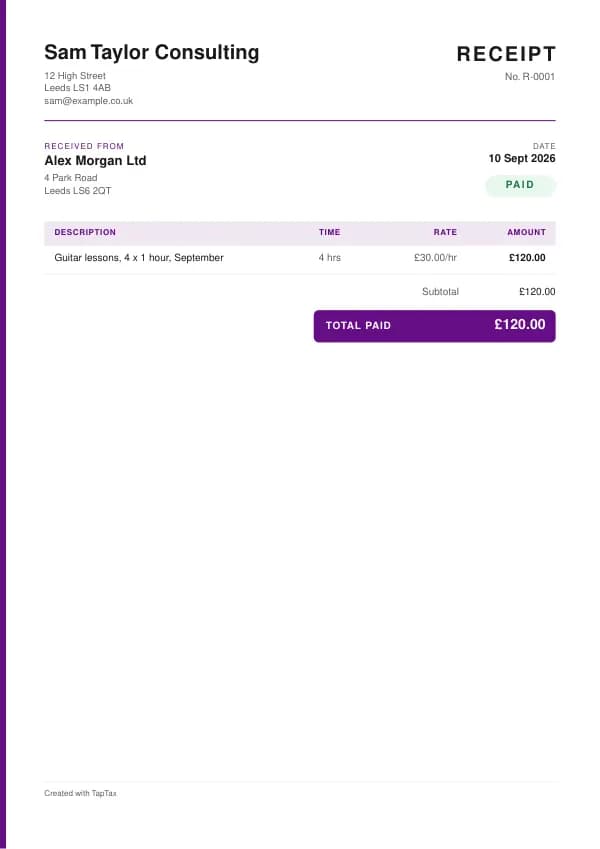
The template's example lines, which you replace with your own:
| Line | Quantity | Price | Amount |
|---|---|---|---|
| Guitar lessons, 4 x 1 hour, September | 4 hours | £30.00 | £120.00 |
| Subtotal | £120.00 | ||
| Total paid | £120.00 |
Filling in the receipt
- Add your business details and the receipt number and date.
- Add the customer's name if you have it.
- Describe what was paid for, with quantity and price.
- Show the amount paid and the payment method.
- If you are VAT registered, add your VAT number and the VAT rate.
- Give the customer a copy, and keep yours with your records.
Receipts as simplified VAT invoices
A VAT-registered business can issue a simplified VAT invoice for supplies of £250 or less, including VAT. It needs your name, address and VAT number, the time of supply, a description of the goods or services, the total payable including VAT, and the VAT rate for each item. That is essentially a receipt with your VAT number and rate on it, which is why many retailers' till receipts are simplified VAT invoices. For sales over £250, a business customer who wants to reclaim VAT needs a full VAT invoice.
Income thresholds that change your paperwork
- Trading allowance£1,000
- MTD from April 2028£20,000
- MTD from April 2027£30,000
- MTD from April 2026£50,000
- VAT registration£90,000
Receipt or invoice?
An invoice asks for payment; a receipt confirms it has been made. When a customer pays on the spot, a receipt is all you need. When you bill first and are paid later, you issue an invoice, then a receipt or a "paid" confirmation on request. Our guide to invoice vs receipt covers the difference.
Numbering receipts
Number receipts in their own sequence, such as R-0001, separate from invoices. A sequence makes it easy to find a receipt when a customer asks and shows your records are complete, which matters most for cash businesses. Never reuse a number, and keep voided receipts rather than throwing them away. Digital receipts from a card reader or till are numbered automatically; if you also write receipts by hand, keep them in a numbered book.
Cash businesses
If much of your income is in cash, receipts and a daily takings record are your main evidence of income. HMRC looks closely at cash businesses, so record every sale, bank takings regularly, and keep till rolls or receipt copies. Consistent records protect you in a compliance check, and help you see how the business is doing. The cash receipt template adds the extra details that make cash sales easy to evidence.
Digital receipts
Emailed or texted receipts are as valid as paper ones, and easier to keep. Card readers and payment apps usually offer them automatically. If you send receipts by email, use your business name as the sender and include the same details as a paper receipt. Keep your copies in one place, ideally linked to the sale in your records, because under Making Tax Digital your records must be digital once it applies to you.
Refunds and returns
Customers usually need their receipt, or other proof of purchase such as a bank statement, to return goods. Consumers have statutory rights to a refund, repair or replacement for faulty goods regardless of your returns policy. When you refund, issue a refund receipt or credit note, and record it against the original sale so your income is correct.
Receipts for your own expenses
Receipts you receive are just as important as those you give. Keep a receipt or invoice for every business expense, because it supports the deduction on your tax return, and if you are VAT registered, a valid VAT invoice or simplified invoice is usually needed to reclaim VAT. Photograph paper receipts before they fade, and use an app such as the TapTax receipt scanner to capture the details straight into your records.
Worked example
A music teacher who is not VAT registered is paid £120 in cash for four lessons. They write receipt R-0042 showing the parent's name, "Guitar lessons, 4 x 1 hour, September", £120, paid in cash, and give the parent the top copy. That evening they add £120 to their takings record, and bank it with the week's other lesson fees on Friday. At the year end, their receipts, takings record and bank statements all agree, so their Self Assessment income figure is easy to prove. If the teacher later registers for VAT, the same receipt with their VAT number and rate added would serve as a simplified VAT invoice.
Common mistakes
- Not recording cash sales. Every sale is income, and receipts are your evidence.
- Leaving your VAT number off receipts when registered. Business customers then cannot reclaim VAT.
- Using a receipt to ask for payment. A receipt confirms payment; use an invoice to request it.
- Typing over a formula. A typed number in a total cell stops updating; restore the formula or protect the sheet.
- Adding rows below the SUM range. Insert rows inside the lines, so the subtotal includes them.
Checklist before you send it
Before a receipt goes out, check it against the list of what it must show:
- The word "Receipt", a number and the date is on it and correct.
- Your business name and address is on it and correct.
- The customer's name, if known is on it and correct.
- What was paid for is on it and correct.
- The amount paid and how (cash, card, transfer) is on it and correct.
- The invoice number it settles, if any is on it and correct.
- VAT number, rate and VAT-inclusive total, if you are registered is on it and correct.
- A copy is saved with your records.
Keep a copy
You must keep your records for at least 5 years after the 31 January submission deadline of the relevant tax year.
Keep a copy of every receipt you issue or receive, digital is fine, with the payments that relate to it. From 6 April 2026, sole traders and landlords with qualifying income over £50,000 must keep digital records and send HMRC quarterly updates under Making Tax Digital, falling to £30,000 from April 2027 and £20,000 from April 2028. The MTD requirement checker shows when it applies to you, and how long to keep invoices covers retention.
Other formats and the full guide
This page covers Excel. The receipt template guide explains the document itself in full, and the same template is available in the other formats from there. To skip the download, the free receipt generator makes a finished PDF online.
A TapTax account, free to start, creates and sends invoices, tracks which are paid, keeps receipts and bills with your records, and files your quarterly updates to HMRC from the same data.
Tools for this
Related guides and definitions
Frequently asked questions
Does the Excel receipt template calculate totals?
Yes. Each line, the subtotal and the total are formulas, so they update as you type quantities and prices.
Will it work in Google Sheets?
Yes. Upload the .xlsx file to Google Drive and open it with Google Sheets; the formulas carry over.
How do I stop the formulas being overwritten?
Unlock the cells you type into, then protect the sheet from the Review menu. Only the unlocked cells can then be edited.
Invoice, get paid, stay ready for HMRC.
TapTax creates and sends your invoices, tracks which ones are paid and files your quarterly updates to HMRC. Start on the free plan, no card needed.
Get started freeSources
The rules on this page come from official guidance.