
Virtual assistant
invoice template
Hourly work and monthly packages, with time logs and rollover rules made clear.
Download the virtual assistant invoice template
Free, with no sign-up. Replace the words in square brackets with your own details; the example lines are ready to keep or change.
Opens the free invoice generator with these lines in place. Make a PDF in your own colours, with your logo. Nothing is stored.
Virtual assistants invoice small business owners, coaches and consultants for admin, inbox and diary management, bookkeeping support, social media and customer service, usually monthly. This free template sets out a virtual assistant invoice the way customers expect to see it, with example lines you can keep or replace.
What goes on a virtual assistant invoice
For packages, show the month, the hours included and the hours used, with any extra hours at the agreed rate. For hourly clients, list the tasks and time by date, or attach your time log.
| Line | Quantity | Price | Amount |
|---|---|---|---|
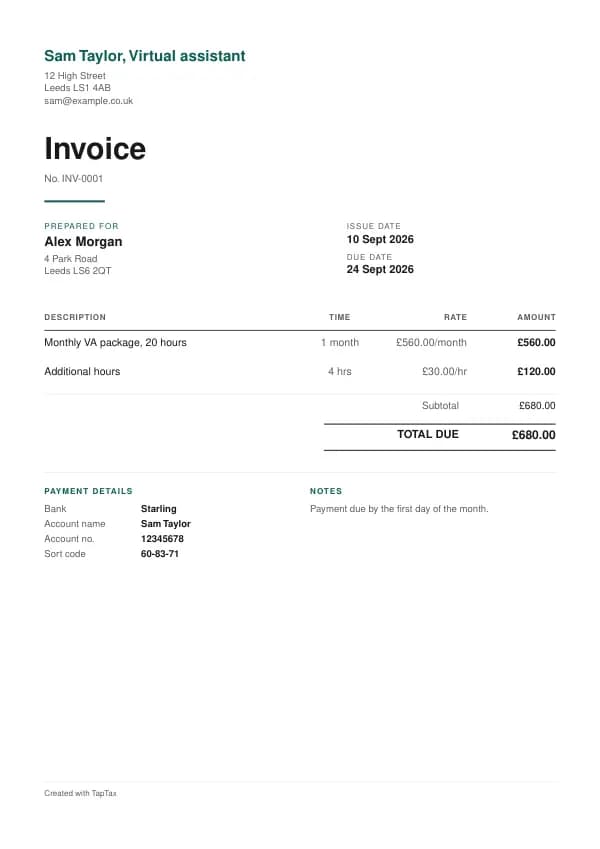
| Monthly VA package, 20 hours | 1 month | £560.00 | £560.00 |
| Additional hours | 4 hours | £30.00 | £120.00 |
| Subtotal | £680.00 | ||
| Total due | £680.00 |
Line by line: Monthly VA package, 20 hours, 1 month × £560.00 = £560.00; Additional hours, 4 hours × £30.00 = £120.00. The subtotal is £680.00. The example assumes you are not VAT registered, so there is no VAT and the total due is £680.00. The figures are illustrative, not a price guide, so use your own rates.
Whatever the job, a UK invoice must carry the basics GOV.UK lists: a unique invoice number, your name or business name and an address, your customer's name and address, a clear description of what you are charging for, the date the work was done and the date of the invoice, the amounts, any VAT, and the total owed. The template has a place for each, and the guide to what a UK invoice must include explains the rules behind them.
Number invoices in one unbroken sequence, such as INV-0001, INV-0002 and so on, and never reuse a number, even for a cancelled invoice. The invoice number generator suggests a format and works out your next number.
How virtual assistants price their work
Hourly rates for ad hoc work, and monthly packages of a set number of hours at a slightly lower rate, paid in advance. Specialist tasks such as bookkeeping, technical setup or out-of-hours work are priced higher.
Whatever the model, write it on the invoice as the customer agreed it: the unit (hour, day, job, item), the quantity and the rate on each line. A customer who can see how a total was built pays faster than one who has to ask. If you are working out what to charge in the first place, the day rate calculator works back from the income you want, and the markup calculator shows what you keep on anything you buy in.
Agree this before you start
Agree the tasks, response times, working hours, the package size and whether unused hours roll over, the rate for extra hours, access to the client's systems and passwords, confidentiality, and the notice needed to change or end the package.
When to send a virtual assistant invoice
Packages monthly in advance, with extra hours invoiced in arrears; hourly clients monthly in arrears.
The sooner an invoice goes out, the sooner it is paid: the payment clock starts when the customer receives it. Send it by email as a PDF on the day the work is finished, and the guide to sending an invoice covers what to put in the email.
VAT on virtual assistant invoices
Standard-rated for a registered VA; overseas business clients are usually outside the scope of UK VAT.
Digital and technical services are standard-rated at 20% once you are VAT registered. Work for a business customer outside the UK is generally outside the scope of UK VAT, and the invoice should state that and show the customer's country. Below £90,000 of turnover you need not register and your invoices carry no VAT.
You must register for VAT when your taxable turnover over any rolling 12 months goes above £90,000, or you expect it to in the next 30 days alone. The VAT registration checker tracks where you are, and invoicing without a VAT number explains what an unregistered invoice looks like.
Who virtual assistants invoice
Most clients are businesses, and businesses pay invoices through processes: a supplier set-up form, a purchase order and an accounts payable run. Ask for all three before starting. Many invoices are paid late simply because they lack a PO number or went to the project contact rather than the accounts inbox. Between businesses, you can charge statutory interest and fixed compensation on late payment.
If you handle clients' personal data, such as their customers' details, you may need a data processing agreement; clients increasingly ask for one.
Recharging costs and expenses
Costs you pay out for a job, such as travel, parking, materials or specialist hire, can be passed on to the customer when you agreed to it. Put each on its own line with a short description, and keep the receipts. Recharged costs are part of your income, and the original cost is your expense; if you are VAT registered, VAT is normally charged on the recharge at the rate of your main service. Only a genuine disbursement, a cost paid purely as the customer's agent, is passed on without VAT. The mileage calculator shows what business travel is worth at HMRC's rates.
Timesheets, milestones and scope changes
Most digital invoices are paid on evidence. For day-rate work, attach or summarise a timesheet: dates, hours and what was done. For fixed-price work, reference the milestone and the client's sign-off. Scope changes are the usual cause of disputes, so keep a simple change log: each request, its estimate and the client's approval, and invoice approved changes as separate lines. If you work through your own limited company for a client in the private sector, the off-payroll working rules may make the client decide your status; as a sole trader you are simply self-employed, and your invoices should read like a business's, with your own business name and terms.
Deposits, stages and cancellations
Packages paid in advance act as the commitment.
Fixed-price projects commonly bill a deposit, milestones and a final payment; day-rate work bills weekly or monthly in arrears against a timesheet; retainers bill monthly in advance. Match the invoice to the model you agreed, and attach the timesheet or milestone sign-off.
Payment terms for virtual assistants
Packages by the first of the month; extra hours within 7 days.
If you agree no terms with a business customer, the law sets payment at 30 days after they receive the invoice or the work, whichever is later. Agreed terms between businesses can run to 60 days, or longer only where that is fair to both sides. When a business pays late, the Late Payment of Commercial Debts (Interest) Act 1998 lets you claim interest at 8% a year above the Bank of England base rate plus fixed compensation, which the late payment interest calculator works out. These rights do not apply to invoices sent to private individuals, so for household customers your own terms matter even more.
Fixed compensation for a late business payment
- Debt up to £999.99£40
- £1,000 to £9,999.99£70
- £10,000 or more£100
Getting paid faster
Three details decide how quickly most invoices are paid. First, your bank details on the invoice itself: account name, sort code and account number, with the invoice number as the payment reference so you can match the money when it lands. Second, a clear due date rather than "payment on receipt", which customers read as "whenever". Third, a polite reminder the day after the due date, then again at 7 and 14 days. A card payment link on the invoice helps with household customers, who are more likely to pay straight away if it takes one tap. The 30-day payment terms guide and invoice payment terms explain which terms to choose.
If a customer disputes the invoice
Most disputes are about scope: the customer thought something was included that you did not. Respond in writing, point to what was agreed, and separate the part in dispute from the rest, which should be paid on time. If only part of an invoice is questioned, a credit note for that part lets the undisputed amount be settled now. If a business customer still will not pay, a formal letter before action usually does it; after that, in England and Wales, the small claims track of the county court handles claims up to £10,000. The guides to invoice disputes and small claims for an unpaid invoice walk through each step.
Common virtual assistant invoicing mistakes
- No time log. Keep a record of tasks and time, even on packages, so extra hours are easy to justify.
- Unclear rollover rules. State whether unused hours carry over to next month, and for how long.
- Working in the client's systems without an agreement. Agree confidentiality and data handling in writing before you get access.
- Showing VAT when you are not VAT registered. You can only charge VAT with a VAT number, and adding it anyway is an offence. If you are not registered, your invoice shows a total with no VAT line.
- Editing an invoice after sending it. Correct a mistake with a credit note and a new invoice, so your records and your customer's match. The guide to correcting an invoice shows how.
Checklist before you send it
Run through this before every invoice goes out. Each point is a reason invoices get paid late:
- The invoice number is the next in your sequence and has never been used.
- The customer's name and address are right, with their purchase order or reference if they use one.
- Each line shows what was done, the quantity, the unit and the rate.
- The subtotal and total add up, and VAT appears only if you are VAT registered.
- The invoice date, a due date and your bank details are on it.
- A copy is saved with your records before you press send.
Keep a copy of every invoice
You must keep your records for at least 5 years after the 31 January submission deadline of the relevant tax year.
Every invoice you issue is a record of income. Keep a copy of each one, digital is fine, along with the payments that settle them. From 6 April 2026, sole traders with qualifying income over £50,000 must keep digital records and send HMRC quarterly updates under Making Tax Digital, with the threshold falling to £30,000 from April 2027 and £20,000 from April 2028. The MTD requirement checker tells you when it applies to you, and how long to keep invoices covers the retention rules.
Download the virtual assistant invoice template
The template comes in four forms. The Word version opens in Microsoft Word, Google Docs and Pages: replace the words in square brackets and save. The Excel version opens in Excel, Google Sheets and Numbers, and works as a calculator, so each line, the subtotal, the VAT and the total update as you type. The PDF is ready to print. Or skip the download and fill it in online with the free invoice generator, which opens with these virtual assistant lines already in place and makes a PDF in your own colours, with your logo.
When a template stops being enough, a TapTax account, free to start, creates and sends your invoices, tracks which are paid, and files your quarterly updates to HMRC from the same records. Our guide for virtual assistants covers the tax side: expenses, National Insurance and Making Tax Digital.
Tools for this
Related guides and definitions
Frequently asked questions
What should a virtual assistant invoice include?
Your business name and address, a unique invoice number, the date, the customer's name, each piece of work with its price, the total, and your VAT number and the VAT if you are VAT registered.
Do virtual assistants charge VAT?
Only once VAT registered, above £90,000 of turnover.
When should a virtual assistant send an invoice?
Monthly in advance for packages, with extra hours billed in arrears.
Is this virtual assistant invoice template free?
Yes. Download it in Word, Excel or PDF, or fill it in online with the free invoice generator. There is no sign-up, and nothing you type is stored.
Invoice, get paid, stay ready for HMRC.
TapTax creates and sends your invoices, tracks which ones are paid and files your quarterly updates to HMRC. Start on the free plan, no card needed.
Get started freeSources
The rules on this page come from official guidance.