
Greengrocer
receipt template
Fruit, veg, flowers and boxes, with the zero rate and the exceptions explained.
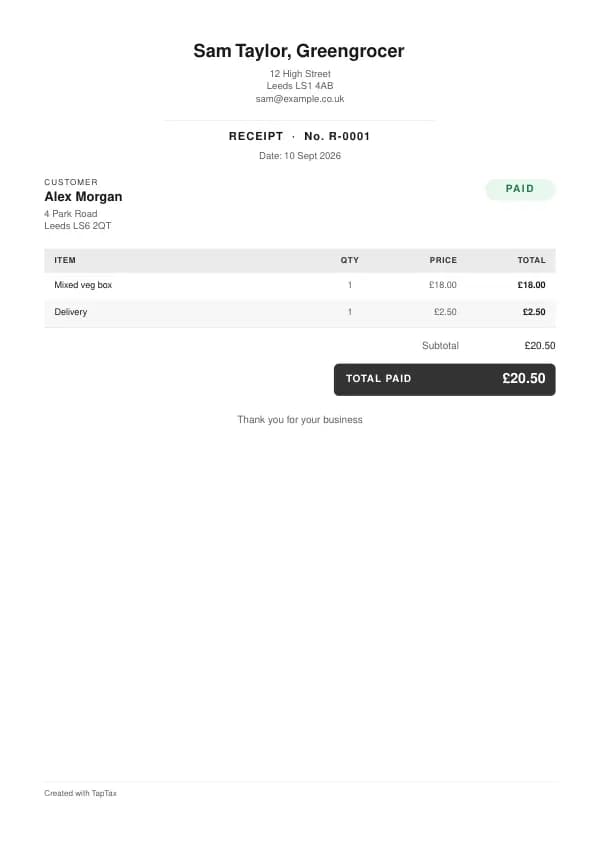
Download the greengrocer receipt template
Free, with no sign-up. Replace the words in square brackets with your own details; the example lines are ready to keep or change.
Opens the free receipt generator with these lines in place. Make a PDF in your own colours, with your logo. Nothing is stored.
Greengrocers sell fruit and vegetables over the counter and at markets, and run veg box schemes and trade supply. Because customers pay at the time, the document you owe them is a receipt. This free greengrocer receipt template has worked example lines, the VAT rules that apply, and the mistakes that cause problems later.
What goes on a greengrocer receipt
Receipts list items by weight or unit; box schemes show the box and delivery; trade customers get your business details.
| Line | Quantity | Price | Amount |
|---|---|---|---|
| Mixed veg box | 1 | £18.00 | £18.00 |
| Delivery | 1 | £2.50 | £2.50 |
| Subtotal | £20.50 | ||
| Total paid | £20.50 |
Line by line: Mixed veg box, 1 × £18.00 = £18.00; Delivery, 1 × £2.50 = £2.50. The subtotal is £20.50. The example assumes you are not VAT registered, so there is no VAT and the total paid is £20.50. The figures are illustrative, not a price guide, so use your own rates.
There is no single legal format for a receipt, but a useful one carries your business name and address, a number, the date, each item or service, the total paid and the payment method, plus your VAT number and the VAT if you are registered. Read invoice vs receipt for when an invoice is needed instead, for example when a business customer asks to pay later.
Give every receipt the next number in a single sequence and keep a copy of each one. Numbers let you find a receipt when a customer comes back for a refund or a copy, and a complete sequence is simple evidence that your takings are fully recorded. If your card reader numbers its own receipts, note which system each receipt came from.
How greengrocers price their work
Per kilo or per item, with box scheme subscriptions and trade prices.
Match each receipt line to your price list, so any discount or add-on is visible. To check your prices leave a real profit after costs, use the profit margin calculator.
Agree this before you start
For box schemes, agree the subscription price, delivery days and areas, how customers skip a week or cancel, and what happens to a box left out when nobody is home. For trade customers such as restaurants, agree prices (often weekly, as produce prices move), delivery times, and payment terms on account. Register with the council as a food business before you start.
When to give a receipt
At the counter for every sale when asked, and automatically for card payments through your reader; for box schemes, a receipt with each subscription charge; for trade customers, a receipt or invoice with each delivery.
Issue it as soon as the customer pays. Card readers and booking apps can send one automatically; check it carries your business details. When a customer needs time to pay, an invoice is the right document, and the invoice generator makes one in a minute.
VAT on greengrocer receipts
Fruit and vegetables are zero-rated food; cut flowers, plants and non-food items are standard-rated for a registered greengrocer.
Food VAT is mostly 0%, with important exceptions at 20%: hot takeaway food, sweets and chocolate, crisps and savoury snacks, ice cream, soft drinks and alcohol. Registered traders often mark each line with its rate. Sales of £250 or less can be receipted with a simplified VAT invoice.
You must register for VAT once your taxable turnover in the last 12 months goes over £90,000. Track it with the VAT registration checker, and use the VAT calculator to split a VAT-inclusive price into net and VAT.
Who pays greengrocers, and how
Shoppers rarely keep a receipt; business buyers always need one. When a cafe or restaurant buys from you, give a receipt with your business details, the date, each item and the price, and your VAT number if you are registered. Register your food business with the council at least 28 days before you start.
Stalls, pitches and takings
Pitch fees, licences and daily takings are the backbone of a trader's records. Keep a receipt for every pitch fee and licence, and record each day's takings, split between cash and card, whether or not customers took receipts. Reconcile card payouts to your card reader's report. If you sell food, your council registration and hygiene rating should be ready to show market managers and trade buyers.
When a customer asks for an invoice
An invoice is for money still owed; a receipt is for money already paid. If a regular customer or a business wants to pay later, give them an invoice with the amount, a due date and how to pay, and follow it with a receipt when they do. Both can be made free with the invoice generator and the receipt generator. The guide to invoice vs receipt has the rules for each.
Deposits and cancellations
Box schemes paid in advance.
Take a deposit for special orders and give a receipt for it, then a second receipt for the balance on collection, so both of you can see the order was paid in full.
Taking payment
Card and cash; subscriptions by recurring card payment.
Cash, card and bank transfer are all income in full, whatever the fees. Card providers pay out in batches with their fee deducted, so reconcile your receipts to the card report, not only to the bank. Record the fee separately as an expense.
Receipts for business customers
Business customers claim what they pay you as an expense, and VAT-registered ones reclaim the VAT, so they need a receipt that proves it: your business name, address, the date, the supply, the total and, if registered, your VAT number and the VAT. Up to £250 including VAT, a simplified VAT invoice does the job; above it, give a full VAT invoice on request.
Refunds and gift vouchers
Refunds should never be handled by quietly cutting the day's takings. Issue a refund receipt, or note the refund against the original receipt, so both the sale and the refund are in your records. For gift vouchers, record the sale when the voucher is bought and the redemption when it is used; a single-purpose voucher is taxed for VAT at the point of sale for registered businesses.
Paper or digital receipts
There is no rule that a receipt must be printed. Emailed and texted receipts are fine, and often better, because both of you keep a copy. What matters is the content: your business name, the date, what was sold and the amount. When your card reader's automatic receipt says only "payment received", send a proper one from this template instead. Digital receipts also make Making Tax Digital simpler, because your sales records are already in digital form.
Common greengrocer receipt mistakes
- Charging the food rate on flowers. Cut flowers and plants are standard-rated for a VAT-registered greengrocer; code them separately at the till.
- Box subscriptions without written terms. State delivery days, how to skip or pause, and the notice to cancel, before customers subscribe.
- Waste not recorded. Produce that goes unsold is part of your cost of sales; note it so your margins are real.
- Receipts that do not match the till or card report. Every sale should have a receipt, and the totals should agree with what reached your bank.
- Mixing personal and business payments. A separate account for business takings makes every receipt easy to match.
Checklist before you hand it over
A quick check before sending saves a chase later:
- The receipt number is the next in your sequence.
- Your business name and address are on it, and your VAT number if you are registered.
- The date is the date the customer paid.
- Each item or treatment is listed with its price, and any deposit or voucher is shown as already paid.
- The total matches the money you actually took, and the payment method is noted.
- A copy is saved with your records.
Keep a copy of every receipt
You must keep your records for at least 5 years after the 31 January submission deadline of the relevant tax year.
Your receipts are the evidence behind the income on your tax return, so keep a copy of every one. Making Tax Digital for Income Tax makes that digital: from 6 April 2026 for qualifying income over £50,000, from April 2027 over £30,000, and from April 2028 over £20,000, with quarterly updates to HMRC. Check your start date with the MTD requirement checker.
Income thresholds that change your paperwork
- Trading allowance£1,000
- MTD from April 2028£20,000
- MTD from April 2027£30,000
- MTD from April 2026£50,000
- VAT registration£90,000
Download the greengrocer receipt template
Download it as a Word document for Word or Google Docs, as an Excel workbook whose totals are live formulas, or as a print-ready PDF. Prefer to fill it in on screen? The free receipt generator opens pre-filled with the example greengrocer lines, lets you choose a template and colour, and makes a finished PDF in a minute, with nothing stored.
For the tax side of the trade, from allowable expenses to Making Tax Digital, read the self-employed greengrocer tax guide. A TapTax account, free to start, keeps your sales and records together and files your quarterly updates to HMRC.
Tools for this
Related guides and definitions
Frequently asked questions
What should a greengrocer receipt include?
Your business name and address, a unique receipt number, the date, the customer's name, each item or treatment with its price, the total, and your VAT number and the VAT if you are VAT registered.
Do greengrocers charge VAT?
Only if VAT registered, above £90,000 of taxable turnover.
When should a greengrocer send a receipt?
At the counter, and on each box scheme charge.
Is this greengrocer receipt template free?
Yes. Download it in Word, Excel or PDF, or fill it in online with the free receipt generator. There is no sign-up, and nothing you type is stored.
Invoice, get paid, stay ready for HMRC.
TapTax creates and sends your invoices, tracks which ones are paid and files your quarterly updates to HMRC. Start on the free plan, no card needed.
Get started freeSources
The rules on this page come from official guidance.