
How to Choose Sole Trader Accounting Software for MTD
Most comparison sites rank accounting software by features, not MTD readiness. Here is how UK sole traders should evaluate any tool before April 2026.
When did choosing accounting software become harder than filing the actual tax return?
Every "best accounting software for self employed UK" list you find online ranks tools by feature count: invoicing, payroll, receipt scanning, bank feeds, multi-currency support. For a sole trader who fixes boilers or rewires houses, that approach has the same logic as judging a van by how many cup holders it has. You need it to move things reliably. The rest is noise.
This post takes a different angle. Instead of scoring software on features you will probably never use, it asks a more useful question: which tools are genuinely built for the way self-employed people in the UK actually work, and which ones are enterprise products wearing a "small business" badge?
- Most accounting software comparison sites rank by feature count, which favours complex tools over simple ones.
- From April 2026, MTD for Income Tax makes HMRC-compatible quarterly submissions a non-negotiable requirement for sole traders earning above £50,000.
- The best accounting software for self-employed UK workers is the one you will actually use every week, not the one with the longest feature list.
- Switching costs are real: moving your records mid-year risks data loss and compliance gaps ahead of MTD deadlines.
- Price alone is a poor guide; some of the cheapest tools create the most expensive problems at submission time.
The Feature Trap: Why Most Comparison Sites Get This Wrong
Open any roundup of the best accounting software for self-employed UK professionals and you will find a comparison table with ticks in columns. Automatic bank reconciliation? Tick. Expense tracking? Tick. VAT return filing? Tick. Project management integration? Tick.
The problem is structural. Most of those comparison sites earn referral revenue from the very products they rank. A tool with thirty features scores better than one with five, regardless of whether those features are useful to a self-employed electrician earning £60,000 a year. The result is that QuickBooks Self-Employed, Xero, FreeAgent, Sage, and Zoho Books all appear near the top of every list, not because they serve the self-employed exceptionally well, but because they serve the comparison site's revenue model exceptionally well.
This matters more now than it ever has. With Making Tax Digital for Income Tax (MTD ITSA) confirmed for sole traders earning above £50,000 from April 2026, and above £30,000 from April 2027, the software you choose will determine whether your quarterly submissions are straightforward or a recurring ordeal. Choosing by feature count is exactly the wrong approach.
- MTD for Income Tax (MTD ITSA)
- HMRC's requirement that sole traders and landlords above the income threshold keep digital records and submit quarterly updates directly to HMRC via approved software, replacing the single annual Self Assessment return. Confirmed start dates: April 2026 for income above £50,000; April 2027 for income above £30,000.
What Self-Employed People Actually Need from Accounting Software
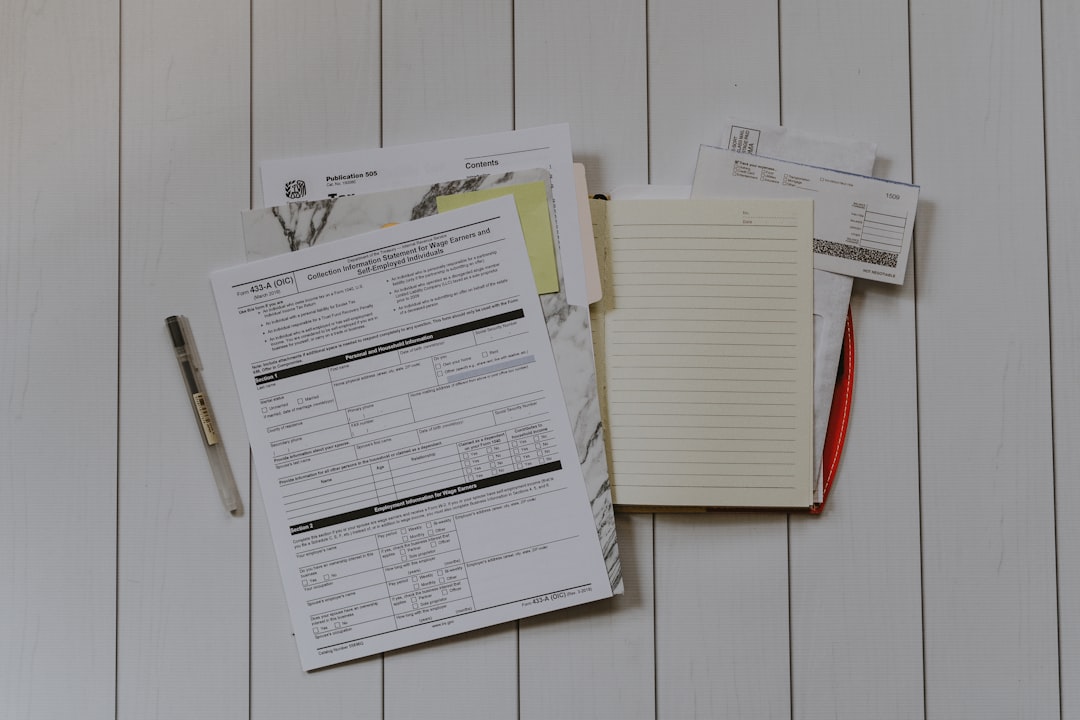
Before comparing tools, it is worth being honest about the job. A sole trader, whether a plumber, freelance graphic designer, or construction subcontractor, needs accounting software to do roughly four things:
- Track money coming in and going out without requiring a bookkeeping qualification
- Categorise expenses accurately so the right figures end up in the right tax boxes
- Generate reports that make sense to someone who has not studied accountancy
- Submit the required information to HMRC on time, in the correct format
Note what is not on that list: multi-currency invoicing, payroll for fifty employees, project profitability tracking, or CRM integration. Those features exist because accounting software vendors want to sell upward into larger businesses. They are not there because a sole trader tiling bathrooms in Coventry asked for them.
The best accounting software for self-employed UK workers is therefore not the most powerful tool. It is the tool that handles those four requirements with the least friction, and that becomes HMRC-compliant for MTD without requiring you to upgrade, migrate, or rebuild your records from scratch.
The Real Cost of Choosing the Wrong Software
Price is the first thing most people look at. It should be the third or fourth.
Consider a plumber turning over £65,000 a year. He chooses a well-known accounting platform at £14 a month because it appeared first on a Google comparison. Twelve months in, he discovers that the MTD ITSA submission feature requires the next pricing tier at £30 a month. He either upgrades or migrates. Migration means exporting his transaction history, importing it into a new tool, reconciling the inevitable formatting errors, and hoping nothing falls through the gaps before his first quarterly submission deadline in August 2026.
That migration risk is not hypothetical. As covered in the post on Making Tax Digital Accounting Software: The Switching Cost Nobody Quotes, the real cost of changing tools mid-compliance-cycle is rarely the headline subscription fee. It is the hours spent fixing data, the risk of a missed quarterly update, and the £200 penalty per missed submission that HMRC's points-based system will eventually issue.
The lesson: the best accounting software for self-employed UK sole traders in 2025 and beyond is the one that includes MTD ITSA compliance at the price you are already paying, not as a premium add-on.
How the Major Players Actually Perform for Sole Traders
QuickBooks Self-Employed
QuickBooks Self-Employed has been a popular choice for freelancers because it separates personal and business spending automatically. The core problem is that Intuit has publicly confirmed it is winding down the Self-Employed product and migrating users toward QuickBooks Simple Start. That migration is not seamless. Users lose certain categorisation history and need to relearn the interface at the worst possible time, directly ahead of the MTD ITSA go-live. If you are currently on QuickBooks Self-Employed, the question is not whether this software is good; it is whether you want to be forced into a migration on Intuit's timetable rather than your own.
Xero
Xero is a genuinely capable product. It is also unambiguously aimed at businesses with employees, accountants, and complex financial structures. For a sole trader, you will pay for features you never touch. Xero's cheapest UK plan starts at around £16 a month and caps invoice numbers. The plan with uncapped invoicing and bank feeds costs significantly more. MTD ITSA support is confirmed but the interface is designed for bookkeepers, not for someone who wants to log a materials receipt in thirty seconds between jobs.
FreeAgent
FreeAgent is the most sole-trader-friendly of the established players, and it is free if you have a NatWest, RBS, or Mettle business account. Outside that ecosystem, it costs around £19 a month. Its MTD ITSA functionality is being developed and it has strong Self Assessment filing built in already. The interface is cleaner than Xero or QuickBooks. The main caveat: as discussed in Accounting App UK: What the Market Won't Tell You, free-via-bank-account products come with data-sharing implications that are worth understanding before you commit.
Sage Accounting
Sage is the legacy choice. It works, it is MTD VAT compliant, and MTD ITSA support is on its roadmap. But Sage's pricing starts at around £15 a month for a product with features that will feel overwhelming if your entire business is you with a van and a mobile number. The interface has improved but it still carries the weight of software originally designed for desktop accounting in the 1990s.
TapTax
TapTax is built specifically for the self-employed sole trader preparing for MTD ITSA. Where Xero and QuickBooks are Swiss Army knives sold to someone who needs a kitchen knife, TapTax is that kitchen knife. Quarterly submissions to HMRC, categorised income and expense tracking, and a final declaration flow, all without the payroll modules, multi-currency dashboards, or project tracking that drive complexity without value for most sole traders. If your business is you, and your priority is MTD compliance without a steep learning curve, that focus matters.
The MTD Test: One Question That Cuts Through the Noise

Here is a single question that eliminates most of the confusion when evaluating the best accounting software for self-employed UK use ahead of MTD ITSA:
Will this software submit my quarterly updates directly to HMRC under MTD ITSA, at the price I am paying today, from April 2026?
Not "will it be compatible eventually." Not "will it require an upgrade." The specific answer: yes or no, at this price, from this date.
If the vendor cannot give you a direct answer to that question, you have your answer. You are looking at a product that may work for Self Assessment today but has not committed to the MTD ITSA functionality sole traders will be legally required to use. Check the HMRC MTD Software: How the Approved List Actually Works post for detail on how HMRC's compatibility testing works and why being on the approved list is not the same as being fully ready.
Five Features Worth Paying For, and Five That Are Not
Worth paying for
Automatic bank feed integration. Pulling transactions directly from your business account eliminates the single biggest source of record-keeping errors: manual data entry. Every MTD-ready product should offer this.
Expense categorisation with HMRC-aligned categories. The categories matter because they map directly to your tax return boxes. Software that uses its own category system and then translates to HMRC boxes introduces a layer where errors hide.
Quarterly submission direct to HMRC. From April 2026, this is not optional. It must be built in, not bolted on.
A simple final declaration flow. MTD ITSA replaces Self Assessment but you still submit an end-of-year declaration. The software should walk you through this without requiring an accountant to translate.
Mobile receipt capture. For tradespeople, expenses happen on site. A decent mobile app that photographs and categorises a receipt in under a minute is genuinely valuable. A desktop-only product is a problem if your office is a van.
Not worth paying for (for most sole traders)
Payroll processing. Unless you employ people, this is dead weight.
Multi-currency invoicing. If all your customers are UK-based and pay in sterling, this feature is marketing copy, not functionality.
Project profitability tracking. Useful for agencies. Less useful for a sole trader whose "project" is a boiler replacement.
Advanced inventory management. A feature aimed at product-based businesses, not service-based sole traders.
Custom reporting dashboards. Impressive in a demo. Unused in practice for the vast majority of self-employed people.
People also ask
When to Switch, and When to Wait
If you are currently using spreadsheets or legacy desktop software, switching before April 2026 is sensible but not urgent today. The risks of switching too early (losing a year of records, adapting to a new interface mid-year) are as real as the risks of switching too late.
A reasonable timeline: choose your software by October 2025, migrate your records before the start of the 2025-26 tax year in April 2025, and run it alongside your existing system for one quarter before going fully live. That gives you time to spot categorisation errors before they become quarterly submission errors.
If you are already on a mainstream product and paying for features you do not use, the honest calculation is whether the switching cost of moving to a simpler, MTD-native tool outweighs the ongoing over-payment. For most sole traders earning £50,000 to £80,000, it does. The Making Tax Digital Free Software: The Expiry Date Problem post covers how to think about timing a migration so you do not end up stranded mid-year.
The Honest Summary

The best accounting software for self-employed UK sole traders in 2025 is not the tool with the most features, the highest score on a comparison site, or the most recognisable brand name. It is the tool that does four things well: tracks your income and expenses accurately, categorises everything correctly for HMRC, submits quarterly updates under MTD ITSA from April 2026, and is simple enough that you will actually use it every week rather than leaving it until panic sets in every quarter.
Every tool on the market claims to meet those criteria. Ask the vendor that single question again: will this submit my quarterly updates to HMRC under MTD ITSA, at the price I am paying today, from April 2026? The answer tells you more than any feature comparison table.
If you started reading this because choosing software felt harder than filing the actual tax return, here is where that ends: go to taptax.co.uk, answer three questions about your trade and income, and you will know in under two minutes whether it fits. That is roughly the same time it takes to read one more comparison site roundup that will not tell you anything different from the last one.
File your MTD quarterly updates in minutes
TapTax imports your bank statements, categorises expenses automatically, and submits to HMRC with a tap. Free plan, no card required.
Start freeA Practical Test for the Best Accounting Software for Self-Employed Work
The best accounting software for self-employed people in the UK is the one that handles Making Tax Digital for Income Tax submissions on the plan you can actually afford, maps expenses to HMRC's own categories rather than generic accounting buckets, and explains what it is doing in language that does not require a bookkeeping qualification to parse. Three criteria, not thirty.
In practice, the test runs as follows. First, check whether the tool appears on HMRC's recognised software list for Income Tax specifically, not just for VAT, because the two approved lists are not the same and many popular tools qualify for one but not the other. Second, confirm that MTD quarterly submission is included in the entry-level plan rather than gated behind an upgrade that appears only after you have already built twelve months of records inside the tool. Third, look at how the software labels expense categories: if it uses "travel and subsistence", "tools and equipment", and "professional fees" that map directly to the self-assessment supplementary pages, you will lose far less time reconciling figures at year end than if it uses generic limited-company labels that need translating every filing cycle.
For a fuller picture of which tools have actually been approved for Income Tax submissions and what that approval does and does not guarantee in practice, the post on how the HMRC MTD approved software list actually works is worth reading before committing to any subscription. Approval is a binary tick on the list, but the quality of implementation behind it varies considerably between providers.
What "MTD-Compatible" Actually Means When You Check the Small Print
The best accounting software for self-employed people in the UK must, from April 2026, do one thing that no feature-count table captures: submit quarterly updates directly to HMRC. Every product now claims some version of "MTD-compatible" in its marketing, but that phrase covers a wide spectrum, from tools that have been running in the HMRC pilot since 2024 through to invoicing apps that have added a submission button and quietly updated their landing page copy.
The practical difference is significant. A tool built for MTD from the ground up stores income and expense entries in categories that map directly to HMRC's data schema. An adapted product may ask you to manually reclassify transactions before each quarterly submission, or may simply fail to appear on HMRC's approved software list, which is the only list that actually matters. Checking that list before committing to any platform takes two minutes and avoids a compliance problem you will not discover until your first submission deadline arrives.
For sole traders currently below the £50,000 threshold who are choosing software ahead of the April 2027 deadline, the risk is slightly different. Free tools can handle basic record-keeping, but many carry a hidden expiry: they become paid-only at the point MTD features switch on, or drop off the approved list when the provider decides the compliance overhead is not worth sustaining. That pattern is documented in detail here and is the main reason price alone is a poor guide when choosing software you plan to rely on for quarterly filing.
Which Accounting Software Is Actually Best for Self-Employed UK Workers
The best accounting software for self-employed UK workers is the one that handles MTD for Income Tax submissions on the pricing tier you can afford, with records you can maintain without hiring a bookkeeper. That is a narrower shortlist than any comparison table suggests, and in 2026/27 it comes down to two filters before anything else.
First: does the software appear on HMRC's recognised list for MTD ITSA, and does your chosen plan include quarterly submission rather than just invoicing and expense tracking? Several popular tools gate MTD compliance behind a higher pricing tier, so the headline price is not the price that keeps you compliant. Second: can you get your existing transaction records into the tool without a data-engineering project? Bank statement import, whether via CSV or a direct bank connection, should work cleanly on day one. For a detailed look at which products actually qualify, see how HMRC's MTD software approved list works in practice.
For a sole trader earning between £50,000 and £80,000, the choice in 2026/27 falls between two categories: purpose-built MTD tools designed for self-employed filers, and general small-business platforms that added MTD compliance as a later feature. Purpose-built tools tend to cost less and require less configuration; general platforms tend to offer capabilities you will not need and charge you for the privilege. If your business is straightforward, simpler almost always wins.
Frequently asked questions
Which accounting software is best for a UK sole trader earning £60,000?
For a sole trader at that income level, the priority is MTD ITSA compatibility from April 2026. TapTax is built specifically for sole traders at this scale. FreeAgent is a solid alternative if you bank with NatWest or RBS. Avoid paying for Xero or QuickBooks tiers loaded with features your business does not need.
Can I use Excel or Google Sheets as my accounting software for MTD?
Not on its own. HMRC requires digital submission via approved software under MTD ITSA. Spreadsheets can be used for record-keeping only if you pair them with HMRC-approved bridging software to handle the actual submission. Most sole traders find purpose-built MTD software simpler and cheaper than managing the bridging workaround.
Is QuickBooks Self-Employed being discontinued in the UK?
Intuit has confirmed it is winding down the QuickBooks Self-Employed product and migrating users to QuickBooks Simple Start. The migration is not fully seamless and some categorisation history may be affected. If you are currently on QuickBooks Self-Employed, it is worth reviewing your options before HMRC's MTD ITSA deadline in April 2026.
How much should I expect to pay for MTD-compliant accounting software as a sole trader?
Expect to pay between £7 and £20 per month for a product that genuinely covers MTD ITSA quarterly submissions at its base or standard pricing tier. Be wary of tools that price MTD functionality as a premium upgrade, as this often means a forced price increase just before the compliance deadline hits.
What is the difference between Self Assessment software and MTD accounting software?
Self Assessment software helps you compile and submit your annual tax return. MTD ITSA accounting software must also handle quarterly digital record submissions directly to HMRC throughout the year, replacing the single annual return. Not all current Self Assessment tools are confirmed for MTD ITSA; always check the vendor's roadmap and the HMRC approved software list.
Work out your own numbers
You might also like
Stop dreading your tax return.
TapTax imports your bank statements, categorises expenses automatically, and submits quarterly updates to HMRC. Free plan, no card required.
Get started free