
Flat rate scheme invoice
template
A normal VAT invoice for businesses on the Flat Rate Scheme: 20% to your customer, your flat rate to HMRC.
Download the flat rate scheme invoice template
Free, with no sign-up. Replace the words in square brackets with your own details.
The free invoice generator makes a finished PDF with your details, logo and colours. Nothing is stored.
The Flat Rate Scheme simplifies VAT for small businesses: you charge VAT at the normal rate, but pay HMRC a fixed percentage of your VAT-inclusive turnover instead of working out VAT on every sale and purchase. A common mistake is to put the flat rate on the invoice. It does not belong there. Your customers see a normal VAT invoice at 20% and reclaim VAT as usual; this template is exactly that.
- Flat rate scheme invoice
- The VAT invoice a business on the VAT Flat Rate Scheme issues. It charges VAT at the normal rate, exactly like any VAT invoice; the flat rate only changes how much the business pays HMRC, not what the customer sees.
When to use a flat rate scheme invoice
Use this template if you are registered for the VAT Flat Rate Scheme. You can join if your VAT taxable turnover, excluding VAT, is expected to be £150,000 or less in the next 12 months, and you must leave if your total income, including VAT, goes over £230,000. Your invoices to VAT-registered customers must still be full VAT invoices, issued within 30 days of the tax point, with your VAT number and VAT at the normal rate for each item.
What a flat rate scheme invoice must show
| What it shows | Why it matters |
|---|---|
| A sequential invoice number | Identifies the invoice |
| The tax point and invoice date | When the supply was made |
| Your name, address and VAT registration number | Proves you can charge VAT |
| Your customer's name and address | Who was supplied |
| A description, quantity, unit price and VAT rate for each line | The normal VAT rate, not your flat rate |
| The total excluding VAT and the total VAT in sterling | What the customer reclaims |
Do not show your flat rate percentage on the invoice. It is a private arrangement between you and HMRC for working out what you pay; the customer's VAT is the normal VAT on the invoice.
An example flat rate scheme invoice
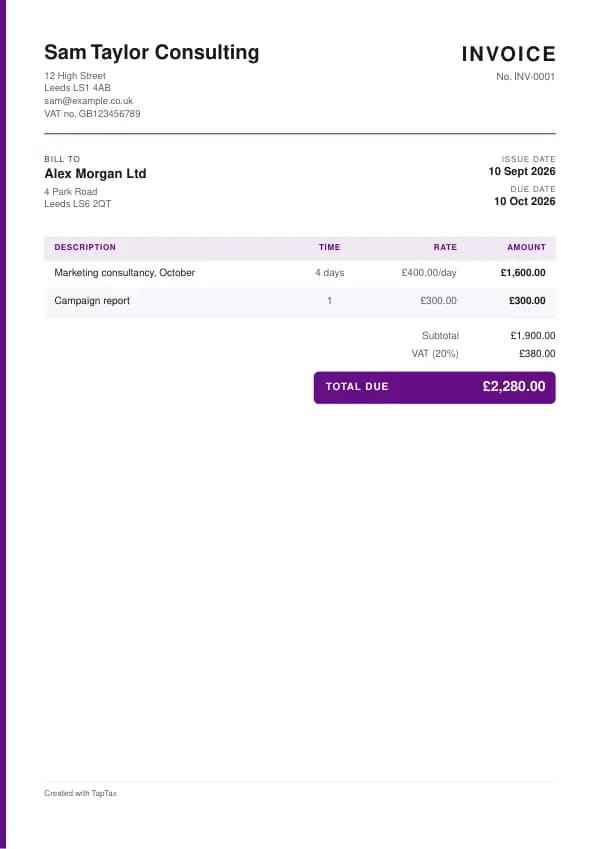
The template comes filled in with example lines like these, so you can see how each part works before replacing them with your own.
| Line | Quantity | Price | Amount |
|---|---|---|---|
| Marketing consultancy, October | 4 days | £400.00 | £1,600.00 |
| Campaign report | 1 | £300.00 | £300.00 |
| Subtotal | £1,900.00 | ||
| VAT at 20% | £380.00 | ||
| Total due | £2,280.00 |
Line by line: Marketing consultancy, October, 4 days × £400.00 = £1,600.00; Campaign report, 1 × £300.00 = £300.00. The subtotal is £1,900.00, VAT at 20% adds £380.00, and the total due is £2,280.00. The figures are illustrative; replace them with your own.
How to fill in the template
- Add your business details and VAT registration number.
- Add your customer's details, the invoice number, tax point and date.
- List each item with its price and the normal VAT rate (usually 20%).
- Show the VAT and total exactly as on any VAT invoice.
- Leave your flat rate percentage off the invoice.
- Record the VAT-inclusive total in your flat rate turnover.
Give each flat rate scheme invoice its own number in a single sequence, and never reuse one. A number lets you and your customer refer to the document without confusion, and an unbroken sequence shows your records are complete. The invoice number generator suggests a format that stays tidy for years.
How the Flat Rate Scheme works
On the scheme, you charge customers VAT at the normal rate, then pay HMRC a flat percentage of your gross, VAT-inclusive turnover for the period. The percentage depends on your business sector, with a 1% reduction in your first year of VAT registration. You generally cannot reclaim VAT on purchases, except for capital assets costing £2,000 or more including VAT. Businesses that spend very little on goods, called limited cost traders, use a flat rate of 16.5%, which often removes the benefit of the scheme, so check the test each quarter.
UK VAT rates
- Standard rate20%
- Reduced rate5%
- Zero rate0%
Flat rate invoice or standard VAT invoice?
They are the same document. A VAT invoice under the standard scheme and one under the Flat Rate Scheme look identical to the customer. The difference is on your VAT return: standard scheme businesses pay output VAT minus input VAT; flat rate businesses pay a percentage of turnover.
The limited cost trader test
You are a limited cost trader if your spending on relevant goods, including VAT, is less than 2% of your VAT-inclusive turnover in the period, or more than 2% but less than £1,000 a year. Relevant goods exclude capital assets, food and drink for you or your staff, vehicles and fuel (unless you are in the transport business), and services. Limited cost traders use 16.5%, which for many service businesses means paying more VAT than under the standard scheme.
Working out what you pay
Suppose a consultant on a 14% flat rate invoices £1,900 plus £380 VAT, £2,280 in total. They pay HMRC 14% of £2,280, which is £319.20, and keep the difference of £60.80. Under the standard scheme they would pay £380 less any VAT on costs. Whether the scheme saves money depends on your flat rate, your costs and your first-year discount, so run the numbers before joining and review them each year.
Leaving the scheme
You must leave if your total VAT-inclusive income in the last 12 months exceeds £230,000, or you expect it to in the next 30 days. You can also leave voluntarily, for example when buying a lot of equipment or when you become a limited cost trader. After leaving, you account for VAT under the standard rules and cannot rejoin for 12 months.
Records to keep on the scheme
Keep a record of your flat rate turnover for each period, the flat rate you used, and how you worked out the VAT due, alongside your sales invoices. You still need proper VAT invoices for sales to VAT-registered customers, and invoices for any capital assets over £2,000 you reclaim VAT on. Making Tax Digital for VAT applies to flat rate businesses as well.
The first-year discount
In the first year after VAT registration, a business on the scheme takes 1% off its flat rate. The discount runs until the day before the first anniversary of registration, not the anniversary of joining the scheme, so a business that registers first and joins later gets a shorter discount. The rate used for each period should be recorded with the return. The discount does not apply to the 16.5% limited cost trader rate. For a new business with few costs, the first-year discount can make the scheme worth joining for a year even if it will stop being worthwhile later, so it is worth setting a reminder to review the choice at the anniversary.
Common flat rate scheme invoice mistakes
- Showing the flat rate percentage on the invoice. Customers see VAT at the normal rate; the flat rate is between you and HMRC.
- Charging customers the flat rate instead of 20%. You still charge the normal VAT rate on sales.
- Missing the limited cost trader test. Check it every period, or you may pay the wrong rate.
Checklist before you send it
Before a flat rate scheme invoice goes out, check it against the list of what it must show:
- A sequential invoice number is on it and correct.
- The tax point and invoice date is on it and correct.
- Your name, address and VAT registration number is on it and correct.
- Your customer's name and address is on it and correct.
- A description, quantity, unit price and VAT rate for each line is on it and correct.
- The total excluding VAT and the total VAT in sterling is on it and correct.
- A copy is saved with your records.
Sending it
Send the flat rate scheme invoice as a PDF attached to an email, not as an editable file. In the email, say what it is, its number, the amount and any date that matters, so the reader can act without opening the attachment. Send it to the person or inbox that deals with it, which for a business is often an accounts address rather than the person you worked with, and keep a copy of the email and the PDF together in your records.
Keep a copy
You must keep your records for at least 5 years after the 31 January submission deadline of the relevant tax year.
Keep a copy of every flat rate scheme invoice you issue or receive, digital is fine, with the payments that relate to it. From 6 April 2026, sole traders and landlords with qualifying income over £50,000 must keep digital records and send HMRC quarterly updates under Making Tax Digital, falling to £30,000 from April 2027 and £20,000 from April 2028. The MTD requirement checker shows when it applies to you, and how long to keep invoices covers retention.
Download the flat rate scheme invoice template
The template comes as a Word document for Word, Google Docs and Pages, an Excel workbook for Excel and Google Sheets, and a print-ready PDF. Replace the words in square brackets with your own details. In the Excel version each line, the subtotal and the total are formulas, so the figures update as you type. Or fill it in online with the free invoice generator, which makes a finished PDF with your details, in your colours.
Related documents in the same family: the zero-rated invoice template, VAT-exempt invoice template, reverse charge invoice template, VAT invoice template and simplified VAT invoice template. All of them follow the same numbering and record-keeping rules, and each page explains what that document must show.
A TapTax account, free to start, creates and sends invoices, tracks which are paid, keeps receipts and bills with your records, and files your quarterly updates to HMRC from the same data.
Tools for this
Related guides and definitions
Frequently asked questions
Do I show my flat rate on invoices?
No. You charge and show VAT at the normal rate; the flat rate only affects what you pay HMRC.
Can my customers reclaim VAT if I use the Flat Rate Scheme?
Yes, as normal, from the VAT shown on your VAT invoice.
Who can join the Flat Rate Scheme?
VAT-registered businesses expecting VAT taxable turnover, excluding VAT, of £150,000 or less in the next 12 months.
Invoice, get paid, stay ready for HMRC.
TapTax creates and sends your invoices, tracks which ones are paid and files your quarterly updates to HMRC. Start on the free plan, no card needed.
Get started freeSources
The rules on this page come from official guidance.