
Web developer
invoice template
Build milestones, day-rate sprints and support retainers, with hosting and licences recharged.
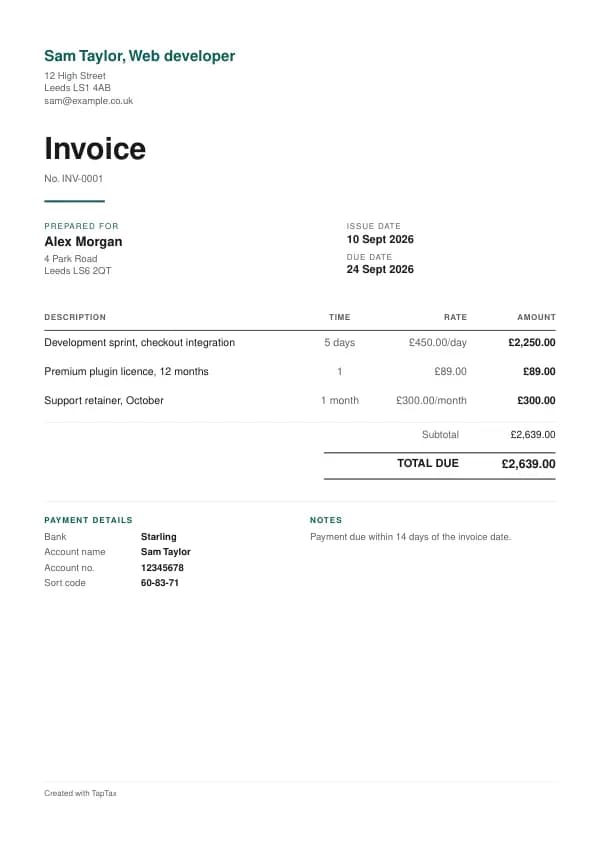
Download the web developer invoice template
Free, with no sign-up. Replace the words in square brackets with your own details; the example lines are ready to keep or change.
Opens the free invoice generator with these lines in place. Make a PDF in your own colours, with your logo. Nothing is stored.
Freelance web developers invoice agencies, start-ups and established businesses for site builds, feature development, integrations and ongoing support. Below is a ready-made web developer invoice template, with worked example lines, the VAT and payment rules that apply, and the mistakes that most often delay payment.
What goes on a web developer invoice
For fixed-price work, name the milestone (discovery, build, testing, launch) and what was delivered. For day-rate work, list the days with a one-line summary of each. Put hosting, plugins, licences and third-party services on their own lines, with the period they cover.
| Line | Quantity | Price | Amount |
|---|---|---|---|
| Development sprint, checkout integration | 5 days | £450.00 | £2,250.00 |
| Premium plugin licence, 12 months | 1 | £89.00 | £89.00 |
| Support retainer, October | 1 month | £300.00 | £300.00 |
| Subtotal | £2,639.00 | ||
| Total due | £2,639.00 |
Line by line: Development sprint, checkout integration, 5 days × £450.00 = £2,250.00; Premium plugin licence, 12 months, 1 × £89.00 = £89.00; Support retainer, October, 1 month × £300.00 = £300.00. The subtotal is £2,639.00. The example assumes you are not VAT registered, so there is no VAT and the total due is £2,639.00. The figures are illustrative, not a price guide, so use your own rates.
The legal minimum is the same for every trade. GOV.UK says an invoice needs a unique number, your business name and address, the customer's name and address, a description of the work, the supply date and invoice date, the amount charged, VAT if you charge it, and the total due. This template lays each of those out for web developers; for the detail, read what a UK invoice must include.
Give each invoice the next number in a single sequence and never reuse one. A cancelled invoice keeps its number and is cancelled with a credit note. If you want a format that stays tidy for years, try the invoice number generator.
How web developers price their work
Agencies and larger clients usually pay a day rate; small businesses prefer a fixed price per project, split into milestones. Ongoing support is sold as a monthly retainer covering a set number of hours, with extra hours at an agreed rate. Licences, hosting and paid APIs are recharged at cost or with a handling margin you disclose.
Keep the pricing visible. Each line should show the quantity, the unit and the rate, so the customer can match it to the quote. To set rates that cover your costs and your tax, try the day rate calculator; for materials and stock you resell, the profit margin calculator shows the margin you really make.
Agree this before you start
Agree the scope in writing (features, pages, integrations, browsers and devices supported), the milestones and what sign-off looks like, how change requests are estimated and approved, who owns the code and when it passes to the client, where the code and hosting accounts live, warranty for bugs after launch, and the support terms that follow.
When to send a web developer invoice
For milestone projects, invoice when each milestone is signed off; for day-rate work, weekly or monthly with the days listed; retainers at the start of each month.
An invoice sent on the day tends to be paid on time; one sent weeks later tends to be paid weeks later. Email it as a PDF and keep a copy. The invoice due date calculator shows exactly when payment falls due under your terms.
VAT on web developer invoices
Development is standard-rated for a registered developer; software licences and hosting you resell carry the same rate, and services to overseas business clients are usually outside the scope of UK VAT.
Once registered, web developers charge 20% to UK clients. For overseas business clients the service is normally supplied where the customer belongs, so no UK VAT is charged; say so on the invoice and keep evidence that the customer is in business, such as their VAT number or company details.
Registration is compulsory once taxable turnover in the last 12 months passes £90,000, or when you expect to pass it within the next 30 days. Check your position with the VAT registration checker; until then, see invoicing without a VAT number.
Who web developers invoice
Business clients pay through accounts payable, not the person you work with. Get the purchase order, the invoicing email and the payment terms agreed before the first sprint or deliverable, and quote them on every invoice. When a business pays late, the Late Payment of Commercial Debts (Interest) Act gives you interest at 8% above Bank Rate plus fixed compensation.
Clients should own their domains, hosting and code repositories, or have a clear path to take them over; putting that in your terms avoids a difficult conversation if the relationship ends.
Recharging costs and expenses
When you agreed to pass on costs, list them separately: mileage at an agreed rate, parking, materials or anything bought for the customer. The recharge is income and the cost is an expense, both in full. Registered businesses charge VAT on the recharge as part of their service; a true disbursement, paid as the customer's agent, is the narrow exception. Use the mileage calculator to value your business miles.
Timesheets, milestones and scope changes
Evidence gets digital invoices paid: a timesheet for time-based work, a milestone sign-off for fixed-price work, and an approved change request for anything outside scope. Invoice changes on their own lines with the approval reference. Contractors should also know where they stand on employment status: a sole trader invoicing clients in their own business name, with their own terms and several clients, looks like a business; a single client directing your hours looks like employment.
Deposits, stages and cancellations
Fixed-price projects commonly start with a 25% to 50% deposit; day-rate and retainer work needs none.
Invoice time-and-materials work in arrears, usually weekly or monthly, with the days worked listed. Invoice fixed-price work by milestone, with a deposit to start. Retainers are billed in advance each month for the hours or outcomes they cover.
Payment terms for web developers
Agencies and businesses usually pay 14 or 30 days after the invoice; retainers in advance.
Between businesses, the default when nothing is agreed is 30 days from receipt of the invoice or the work, whichever comes later, and agreed terms should not normally exceed 60 days. Late business payers owe statutory interest at 8% above Bank Rate plus fixed compensation per invoice; the late payment interest calculator does the sums. Private individuals are not covered by that Act, so agree your terms with them in writing before the work starts.
Fixed compensation for a late business payment
- Debt up to £999.99£40
- £1,000 to £9,999.99£70
- £10,000 or more£100
Getting paid faster
Put everything the customer needs to pay on the invoice: your bank name, account name, sort code and account number, and the reference to use, normally the invoice number. Give a due date, not just "on receipt". Then follow a routine: a reminder the day after the due date, another a week later, and a firmer letter after two weeks. Most late payment is disorganisation, not refusal, and a routine fixes it. Invoice payment terms compares the common options, and the due date calculator turns them into a date.
If a customer disputes the invoice
When a customer queries an invoice, reply quickly and in writing, quote the quote or agreement, and ask them to pay the part they accept while you resolve the rest. A credit note can settle a partial dispute cleanly. Unpaid after reminders? Send a letter before action with a final date; in England and Wales, claims up to £10,000 can then go to the small claims track. Invoice disputes and small claims for an unpaid invoice have the detail.
Common web developer invoicing mistakes
- Building change requests without a written estimate. Every addition outside the agreed scope should be estimated and approved before you build it, then invoiced as its own line.
- Transferring code ownership before payment. State that intellectual property passes to the client when the final invoice is paid in full.
- Recharging licences without the period. Show the licence period on the invoice, so the client knows when it renews and who pays for the renewal.
- Leaving out the due date. "Payment due within 14 days" or a date on the invoice gives you something to chase against. Without one, business customers default to 30 days.
- Losing track of what is unpaid. Chase on the day after the due date, not a month later; the guide to chasing an unpaid invoice has the wording.
Checklist before you send it
A quick check before sending saves a chase later:
- The invoice number is the next in your sequence and has never been used.
- The customer's name and address are right, with their purchase order or reference if they use one.
- Each line shows what was done, the quantity, the unit and the rate.
- The subtotal and total add up, and VAT appears only if you are VAT registered.
- The invoice date, a due date and your bank details are on it.
- A copy is saved with your records before you press send.
Keep a copy of every invoice
You must keep your records for at least 5 years after the 31 January submission deadline of the relevant tax year.
Your invoices are the evidence behind the income on your tax return, so keep a copy of every one. Making Tax Digital for Income Tax makes that digital: from 6 April 2026 for qualifying income over £50,000, from April 2027 over £30,000, and from April 2028 over £20,000, with quarterly updates to HMRC. Check your start date with the MTD requirement checker.
Download the web developer invoice template
Download it as a Word document for Word or Google Docs, as an Excel workbook whose totals are live formulas, or as a print-ready PDF. Prefer to fill it in on screen? The free invoice generator opens pre-filled with the example web developer lines, lets you choose a template and colour, and makes a finished PDF in a minute, with nothing stored.
For the tax side of the trade, from allowable expenses to Making Tax Digital, read the self-employed web developer tax guide. A TapTax account, free to start, keeps your invoices and records together and files your quarterly updates to HMRC.
Tools for this
Related guides and definitions
Frequently asked questions
What should a web developer invoice include?
Your business name and address, a unique invoice number, the date, the customer's name, each piece of work with its price, the total, and your VAT number and the VAT if you are VAT registered.
Do web developers charge VAT?
Only once VAT registered, compulsory above £90,000 of turnover. UK clients then pay 20%; overseas business clients are usually outside UK VAT.
When should a web developer send an invoice?
At each signed-off milestone, weekly or monthly for day-rate work, and monthly in advance for retainers.
Is this web developer invoice template free?
Yes. Download it in Word, Excel or PDF, or fill it in online with the free invoice generator. There is no sign-up, and nothing you type is stored.
Invoice, get paid, stay ready for HMRC.
TapTax creates and sends your invoices, tracks which ones are paid and files your quarterly updates to HMRC. Start on the free plan, no card needed.
Get started freeSources
The rules on this page come from official guidance.