
On this page9 sections
Your van glove box is a fire hazard of crumpled receipts. HMRC wants digital records of every single one, four times a year, starting April 2026. So: does a receipt scanner actually solve this, or are you just buying yourself a shinier version of the same headache?
The Receipt Problem Nobody Talks About Honestly
Every piece of MTD marketing copy promises that scanning your receipts will transform your tax life. The reality is slightly more complicated, and the software vendors have a financial incentive not to explain why.
A receipt scanner is a camera with OCR (Optical Character Recognition) software behind it. It reads the text on your receipt and tries to extract the date, supplier name, and amount. That is genuinely useful. But it is one piece of a much larger puzzle.
Under Making Tax Digital for Income Tax, which becomes mandatory for sole traders and landlords with income over £50,000 from April 2026 (and over £30,000 from April 2027), you are required to:
- Keep digital records of all income and expenses
- Submit quarterly updates to HMRC showing your totals
- Submit an end-of-period statement and a final declaration annually
A receipt scanner handles part of step one. It does not touch steps two or three. If you buy a standalone receipt scanner app and think you are sorted for MTD, you are not.
- Digital Link
- Under MTD rules, a digital link is a direct transfer of data between software systems without manual re-keying. Copying a figure from one spreadsheet to another by hand breaks the digital link and breaches HMRC's compliance requirements.
What 'MTD Compliant' Actually Means for Receipt Scanning

HMRC's requirements are specific. Your records must be kept in "functional compatible software" and there must be a digital link between that software and your HMRC submission. This rules out a workflow like:
- Scan receipt with App A
- Type the figure into a spreadsheet
- Re-type the spreadsheet totals into App B to submit to HMRC
Each manual re-keying breaks the digital link. HMRC published guidance on this in 2021 and has not softened the requirement since.
This is why the question "which receipt scanner should I use for MTD?" slightly misses the point. The better question is: "which MTD app has the best receipt scanning built in?"
April 2026
MTD mandatory for sole traders earning over £50,000
5 submissions
Required per tax year under MTD (4 quarterly + 1 final)
£30,000
Income threshold from April 2027, catching a further wave of sole traders
Standalone Scanners vs. Integrated MTD Apps
Let us look at what the market actually offers, because the difference matters significantly.
Standalone receipt scanners
Apps like Dext (formerly Receipt Bank) and AutoEntry are purpose-built receipt capture tools. They are genuinely impressive at OCR. Dext in particular has years of training data behind it and handles everything from handwritten pub receipts to faded thermal paper from a builder's merchant.
The problem: they are middleware. You still need a separate accounting package (Xero, QuickBooks, FreeAgent) to actually process the data and submit to HMRC. Dext's pricing starts at around £20 per month on its own. Add a compatible accounting platform and you are looking at £40-£60 per month combined, before you have done a single tax return.
For a plumber or electrician earning £60,000 a year, that is £480-£720 annually just to keep HMRC happy. There is a delicious irony in the fact that the software required to comply with a government mandate costs more than most people spend on their accountant before MTD existed.
Integrated MTD apps with receipt scanning
The more practical solution for most sole traders is an app that handles receipt capture and MTD submission in a single product. This is the model TapTax is built on: you scan, the app categorises, and the same system handles your quarterly submissions to HMRC. No re-keying, no broken digital links, no separate subscription stack.
This matters not just for cost but for compliance. Every additional system you introduce creates another potential gap in your digital audit trail.
How Good Is the OCR, Really?
This is the question that marketing brochures never answer directly, so here is the honest version.
Modern OCR for receipts is good but not perfect. Common failure points include:
Faded thermal receipts. Most fuel station and trade counter receipts are printed on thermal paper. Leave them in a warm van for a week and the ink starts to fade. By the time you scan them, the OCR may read "£4" instead of "£44". That is a £40 error on a single receipt.
Handwritten receipts. If you are paying a subcontractor or buying materials from a small independent merchant, handwritten receipts are common. OCR accuracy drops significantly on handwriting.
Multi-line trade invoices. A 14-line invoice from a builders' merchant is not the same as a coffee receipt. Some apps handle complex invoices well; others collapse the line items into a single figure and lose the detail you need for accurate expense categorisation.
VAT breakdowns. If you are VAT-registered, or approaching the threshold, you need the app to correctly identify the net amount and the VAT separately. Errors here compound at tax time.
The practical implication: receipt scanning is a time-saver, not a replacement for human review. Budget a few minutes each week to glance over what your app has captured. Catching a misread receipt in week two is a five-second fix. Catching it in your year-end reconciliation is a half-day problem.
The 'Digital Shoebox' Trap
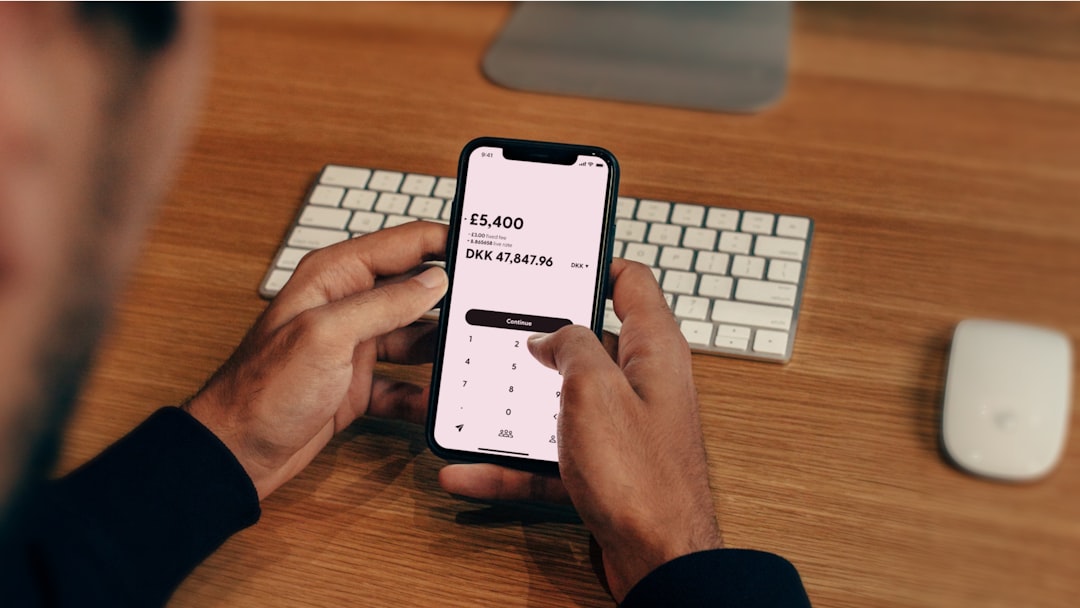
One pattern worth naming explicitly: the digital shoebox.
This is where a sole trader downloads a receipt scanner app, diligently photographs every receipt for three months, and then does absolutely nothing with the data. The receipts are digitised, yes. But they have never been categorised, never been linked to income records, and certainly never been formatted into a quarterly MTD submission.
HMRC does not want a folder of JPEG images. It wants structured digital records with categories, totals, and a submission in the correct format. A pile of scanned receipts without any processing behind them does not constitute digital record-keeping under MTD.
If you have been using a standalone scanner app for a while and have never connected it to an accounting system, you may be further from compliance than you think. This is worth checking now rather than in March 2026.
People also ask
Can I use my phone camera as a receipt scanner for MTD?
You can photograph receipts with your phone, but the image alone is not an MTD-compliant record. The data must be processed into structured digital records and submitted to HMRC via compatible software. A purpose-built app that captures, categorises, and submits is required.
Is a receipt scanner the same as MTD software?
No. A receipt scanner captures expense data but does not submit quarterly updates to HMRC. MTD compliance requires both digital record-keeping and quarterly submissions via HMRC-recognised software. Most standalone receipt scanners need to be connected to a separate accounting platform to achieve full compliance.
How long do I need to keep digital receipts for HMRC?
HMRC requires sole traders to keep records for at least five years after the 31 January submission deadline for the relevant tax year. Under MTD, these records must be kept digitally in functional compatible software throughout that period.
What expenses can I scan and claim as a sole trader under MTD?
You can scan and claim allowable business expenses including tools, materials, fuel, vehicle costs, protective clothing, professional subscriptions, and marketing costs. HMRC's rules on what is allowable have not changed under MTD; the requirement is simply that records are now kept digitally rather than on paper.
What to Look For in an MTD Receipt Scanner
If you are evaluating options, here is a practical checklist rather than a feature list from a vendor's website.
Does it submit to HMRC directly? This is the non-negotiable. If the app cannot send your quarterly updates to HMRC without you copying data into another system, it is not a complete MTD solution.
Does it categorise expenses automatically? Manual categorisation defeats most of the time-saving purpose. Look for an app that learns your spending patterns and suggests categories based on supplier name.
Does it handle multiple income streams? Many sole traders have more than one source of self-employment income. A plumber who also does odd jobs under a separate trade name needs an app that can track both clearly.
What happens when the OCR is wrong? Every app will misread a receipt occasionally. The question is how easy it is to correct. A clean, mobile-first interface matters here; if correction requires navigating three menus, you will stop correcting errors and your records will quietly drift out of accuracy.
Is the pricing transparent? The software market has a particular habit of advertising entry-level pricing and then charging more once you add receipt scanning, HMRC submission, or anything beyond basic bookkeeping. Get the all-in price before you commit.
A Practical Workflow for a Time-Poor Tradesperson
If you earn £65,000 as a self-employed electrician and want to use receipt scanning properly for MTD, here is what a realistic compliant workflow looks like.
Same day or next day: Photograph receipts as you go. A fuel receipt from Monday scanned on Tuesday is accurate. A fuel receipt from four weeks ago that went through the wash is not.
Weekly (10 minutes): Open the app, review what has been auto-categorised, correct anything that looks wrong. Flag any receipts the OCR has clearly struggled with.
End of each quarter: Review your income and expense totals in the app. Check they align with your bank statements. Submit the quarterly update to HMRC via the app.
End of tax year: Complete your end-of-period statement and final declaration. If you have been keeping records properly through the year, this should take an hour or two rather than a weekend.
This is not a particularly burdensome workflow. The problem is that most people do not start it until they are already behind. Starting in April 2025, a full year before the deadline, means you arrive at mandatory MTD with clean records and no catch-up panic.
For context on whether you definitely fall in scope, the MTD Under the Threshold: Are You Actually Safe? post covers the income calculation rules in detail, including how HMRC counts gross turnover rather than profit.
£30-60/month
Typical cost of standalone scanner plus separate MTD accounting software
3-5 hours
Estimated quarterly admin saving for a sole trader using integrated receipt scanning
5 years
How long HMRC requires digital records to be kept after the relevant tax year
The Shoebox Is Closing, Whether You Are Ready or Not
The receipts in your van glove box represent real money. Fuel, tools, materials, safety equipment: all of it legitimately reduces your tax bill, but only if it is recorded correctly and submitted on time. A misread receipt or a missed expense does not just cost you accuracy points; it costs you cash.
From April 2026, HMRC's position is clear: those records must be digital, linked, and submitted quarterly. A standalone receipt scanner gets you partway there. An integrated MTD app gets you all the way there, without paying for two subscriptions or manually copying figures between systems.
That glove box full of receipts is going to become a problem in roughly twelve months. The question is whether it becomes a quick scan on a Tuesday evening or a frantic reconstruction job the night before a deadline.
If you are not sure where your current setup sits on that spectrum, TapTax: The MTD App Built for Sole Traders is worth a read. And if you want to run the numbers on what your actual tax bill looks like before you commit to any software, the Self Employed Tax Estimator 2026 is a good place to start.
The shoebox era is closing. A receipt scanner is the right first instinct. Just make sure the one you pick actually closes the loop.
File your MTD quarterly updates in minutes
TapTax imports your bank statements, categorises expenses automatically, and submits to HMRC with a tap. Free plan, no card required.
Start freeFrequently asked questions
Do I need a receipt scanner to comply with MTD for Income Tax?
You are not legally required to use a receipt scanner, but you must keep digital records of all income and expenses. A receipt scanner makes this significantly easier and reduces errors from manual data entry. The key is that your records must be held in functional compatible software with a digital link to your HMRC submissions.
Which receipt scanner apps work with MTD in the UK?
Apps like Dext and AutoEntry are widely used for receipt capture but require a separate MTD-compatible accounting platform such as Xero, QuickBooks, or FreeAgent to complete submissions. Integrated apps like TapTax combine receipt scanning and quarterly HMRC submissions in a single product, removing the need for a two-system setup.
Can I photograph receipts on my phone and keep them in a folder for MTD?
No. A folder of images does not constitute functional compatible software under HMRC's MTD rules. The data from receipts must be processed into structured digital records with categories and totals, and there must be a digital link to your quarterly submissions. Images alone will not satisfy the compliance requirement.
How accurate are receipt scanners for UK trade receipts like builder's merchants?
Accuracy varies. Modern OCR is strong on standard printed receipts but struggles with faded thermal paper, handwritten notes, and complex multi-line trade invoices. Most apps handle standard fuel and supplier receipts well, but weekly review of auto-categorised entries is advisable to catch and correct errors before they compound.
What is a digital link under MTD and does a receipt scanner create one?
A digital link is a direct transfer of data between software systems without manual re-keying. A standalone receipt scanner only creates a digital link if it integrates directly with your MTD submission software. If you copy figures from a scanner app into a spreadsheet by hand, that breaks the digital link and breaches HMRC's requirements.